
May 2, 2025 – by Jules Holleboom
Changelog
Changelog: See who moved stock and more
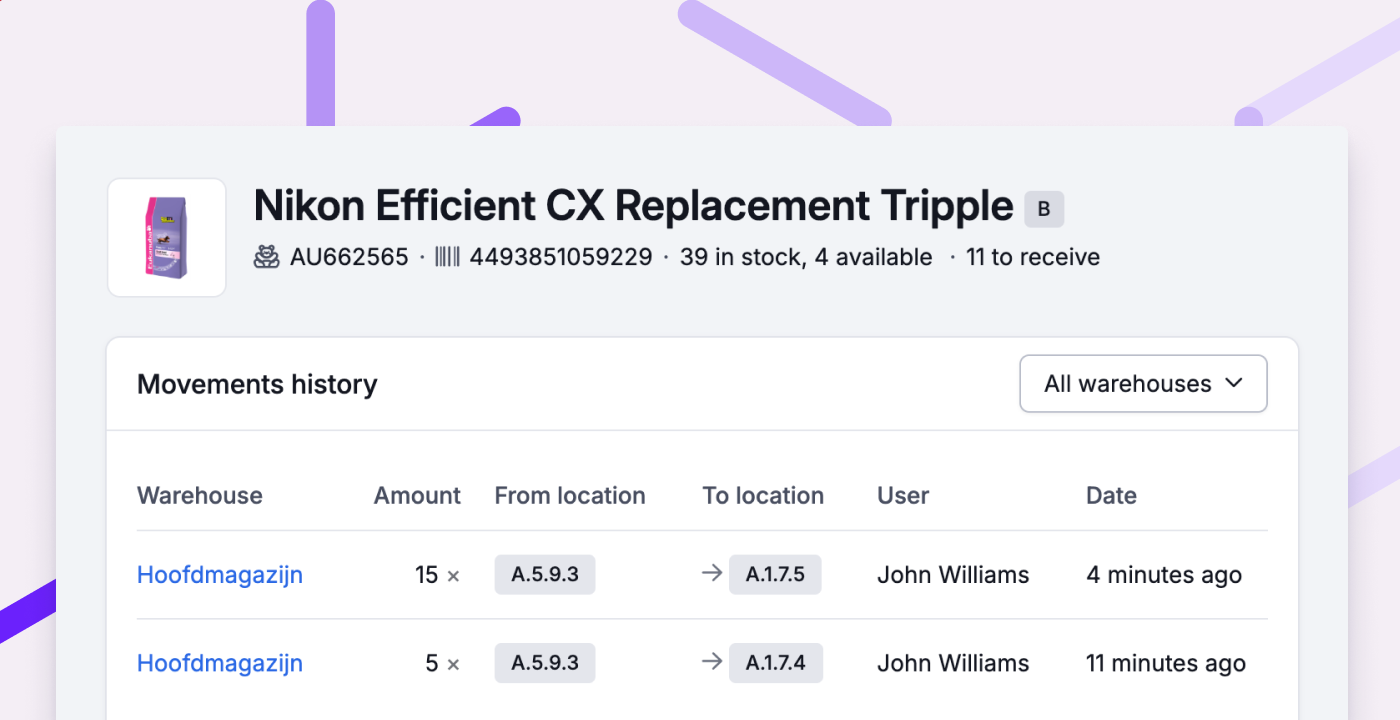
New: See who moved stock
The stock history now shows not only how much stock was moved and where it went, but also who moved it. This was a popular request that comes in helpful when reviewing why something was moved. You can also see who last used a container. This information is, of course, also available via the API.
Other improvements
- The stock history graph now gives a clearer view of a product’s stock over time.
- You can now change your Picqer domain (acme.picqer.com) yourself. Useful if your company name changes, for example. More information (Dutch)
- You can now set a webhook for cancelled picklist shipments.
- In the API, you can now filter (purchase) orders, backorders and picklists by fulfilment customer.
- Cancelled products are now shown more clearly on the order page.
- The product barcode is now included in the single order export.
- Fixed:
- When linking a product to a location in the app, a scanned location with child locations is no longer linked immediately. Instead, all matching locations are shown.
- MyParcel shipments with DPD, DHL and UPS are now correctly reported back to webshops. This was already the case for PostNL.
- Shopify orders processed across multiple pick lists are now correctly reported back to the webshop.
- Purchase orders containing compositions with own stock can now be edited again.
- When receiving a product, the linked location is now always preselected—even if it's a bulk location.
- You can now remove the expected delivery date from a purchase order.
- For orders imported as draft, stock is once again correctly allocated.
- When mentioning a colleague in a comment, the last typed word no longer disappears.
- Dates entered without dashes are now also correctly recognised.
