
Changelog
Changelog: improvements to containers and more
Over the past few weeks, we’ve shipped several improvements. In this final changelog of 2025, you can read what’s new.
Improvements to containers
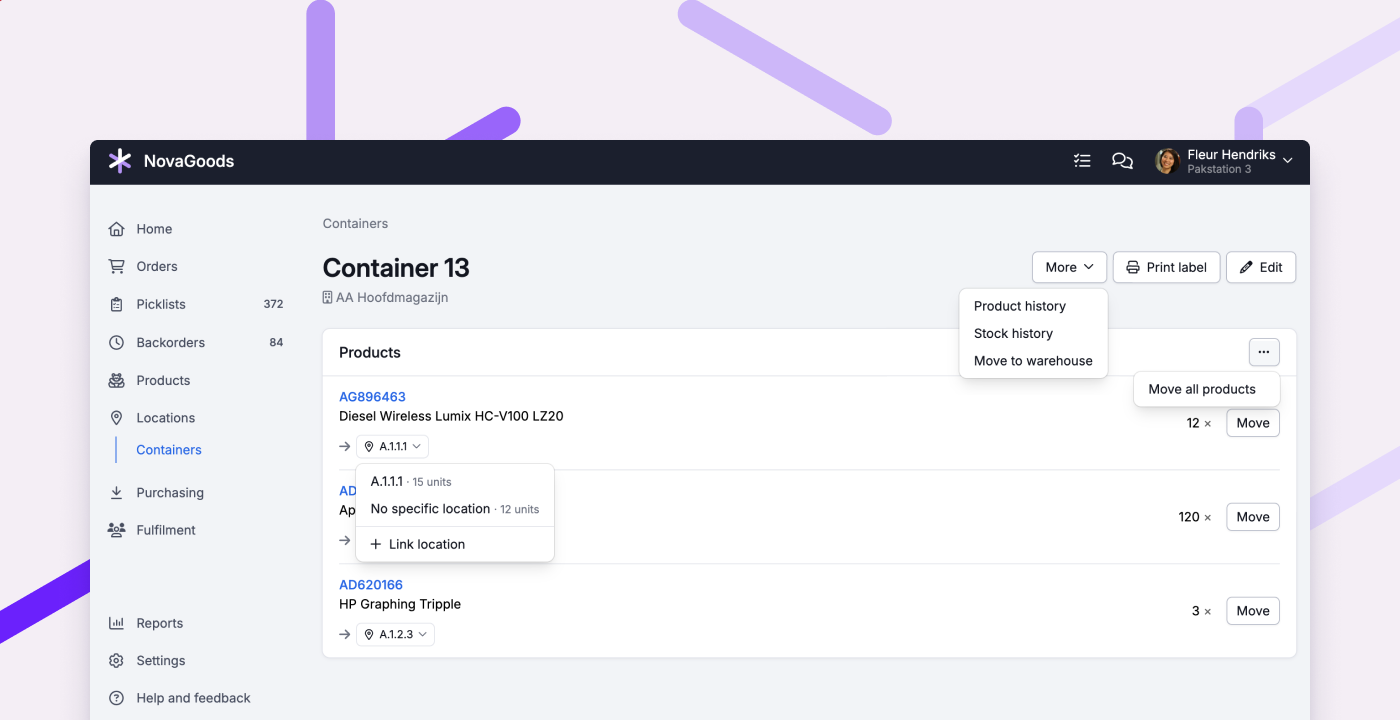
To make moving stock easier, we introduced containers 2 years ago. They help you keep track of what’s in transit, where it is, and where it needs to go next. More and more customers use containers for tasks like receiving products and replenishing stock. We’re seeing more and more customers use containers for things like receiving and replenishment. To make that workflow even smoother, we’ve improved containers in a few key ways:
Move all products from a container in one action
If a container contains multiple products, you can now move everything in a single action to 1 location or another container. This reduces repetitive work and speeds up put-away when you’re placing a box, pallet, or cart at once, or when merging containers.
Change location where stock should be put away
When you move stock to a container, Picqer automatically selects the linked location the stock should be put away in. You can now change this location yourself. Useful if a product doesn’t have a linked location yet, or if you prefer to put the stock away in a different place.
Move a container to another warehouse
Do you use containers to move stock between warehouses? You can now move the container to the other warehouse in one go, so you can continue with put-away there right away.
Other improvements
- PostNL pickup points are now supported for Shopify Advanced and Plus stores.
- Products now load faster when creating a purchase order.
- Fulfilment customers can now edit all product types in the portal.
- Receipts are now automatically completed after inactivity, making it clearer what’s still open and what’s already completed. We also now use the purchase date to determine which purchase order a product should be linked to.
- When importing products, we now take the default VAT group into account.
- When importing products from Shopware, the cover image is now used as the first image.
- When importing products from WooCommerce orders with status ‘pending’, stock is now handled correctly.
- When creating a new order, we now default to the country set on your Picqer account.
