
Changelog
Changelog: an updated fulfilment portal with purchase advice and more
As you may have noticed, we gave the fulfilment portal a major update last month. In this changelog, we’ll walk you through what’s new, and more.
An updated fulfilment portal
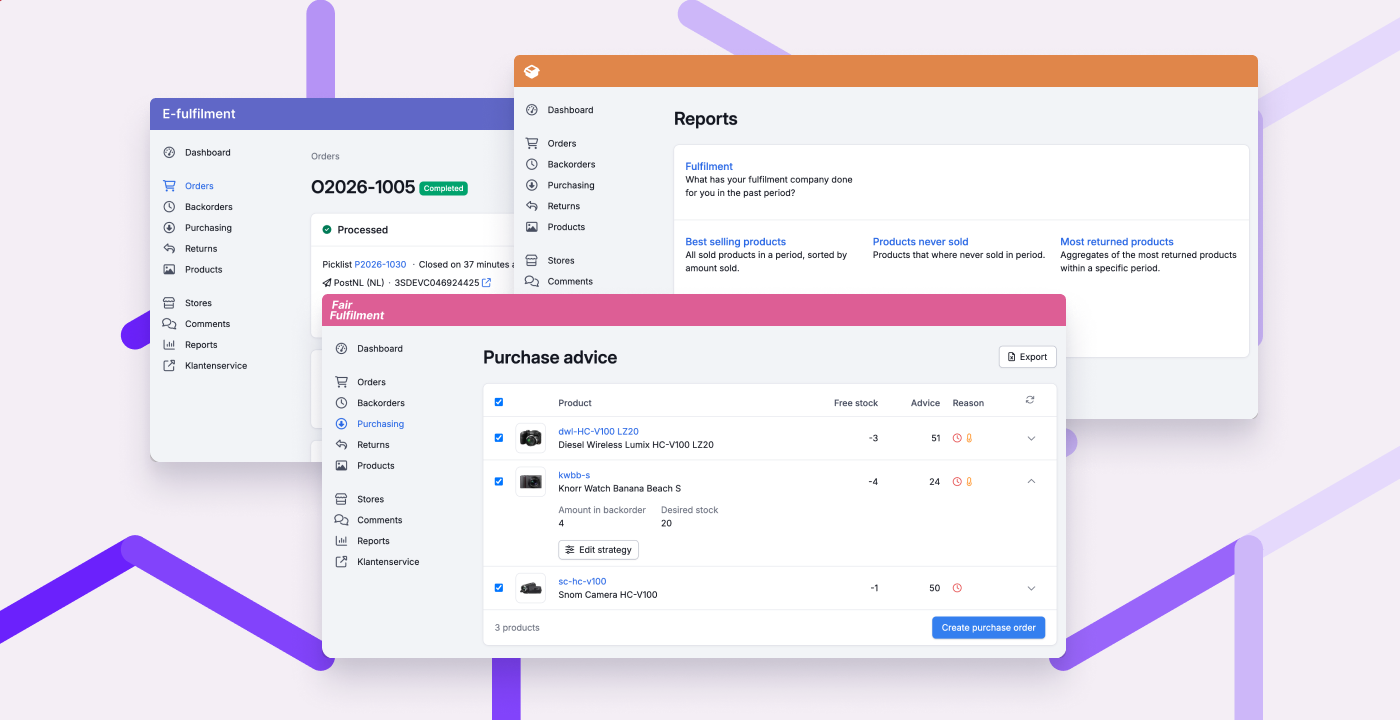
Your fulfilment customers now get a clearer overview, better insight, and more ways to help themselves. That gives you more time to focus on the warehouse. The updated portal has a more modern look, works better on mobile, and can be branded with your own colour and logo.
The biggest news: dedicated purchase advice for your fulfilment customers. They see at a glance what to purchase, and turn it into a purchase order with a single click. The advice is based on open backorders and a stock strategy they can set per product. Read more about how it works
The updated portal includes a lot more:
- Orders: your fulfilment customers can now find and create orders more easily, and see at a glance what stage an order is in.
- Cancel products: your fulfilment customers can now cancel products on an order themselves, as long as they haven't been picked yet.
- Partial deliveries: you can now choose per fulfilment customer whether they can create a picklist themselves when part of an order is in stock.
- Product management: your fulfilment customers can now (de)activate and delete products themselves, if you enabled product management for them.
- Store actions: your fulfilment customers can now import products themselves, send stock to the store, and run a extended order import, provided this is also enabled in the store settings.
- Address book: your fulfilment customers can now edit and delete addresses more easily.
- Reports: your fulfilment customers can now request reports themselves, such as the fulfilment report (showing what has been done for them), stock at a specific moment, and which products sell best or do not sell at all.
- Stock per warehouse: in the fulfilment portal settings, you can now let your fulfilment customers see stock per warehouse.
Over the coming weeks, we’ll keep improving the fulfilment portal. Got feedback or questions? Let us know.
Other improvements
- New integration: Rewize
- When processing returns, you can now choose a location per product, just like with receipts.
- The batch PDF now makes it clearer which products don't have a location.
- You can now require colleagues to scan the destination location whenever they move stock on mobile.
Fixed
- VAT on shipping costs is now processed correctly when importing Shopify orders.
- The container page is fast again, even for containers with many products.
- The overview of picklists to invoice is fast again.
- The selected warehouse is now also used for quick stock changes.
- The supplier name is now always shown correctly on purchase orders, even if you entered it manually.
- Scanning a location on mobile no longer accidentally triggers a product search.
