Fulfilment customer report
The fulfilment customer report gives you an overview per customer of how many orders have been processed and how much capacity that customer has used. Use the report as the basis for your invoicing, or automate the process via the API.
Opening the fulfilment customer report
Go to a specific customer in the fulfilment customers overview and click 'Show report'.
Data in the fulfilment customer report
The fulfilment customer report is divided into three sections: Outbound, Inbound and Storage usage.
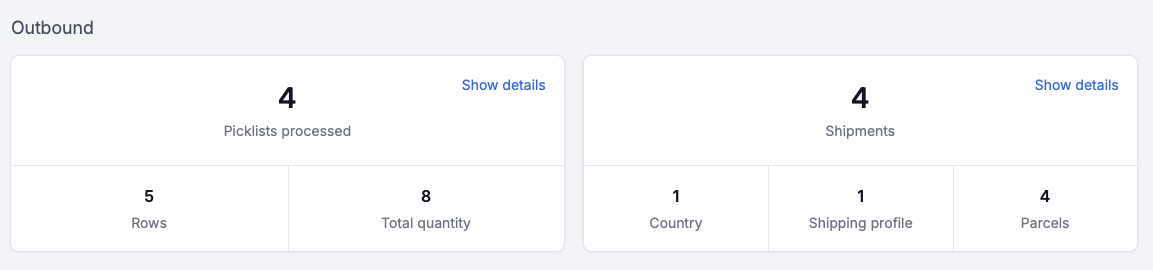
Outbound
Picklists
- Picklists processed: the number of completed picklists, for both orders and returns. For returns, Picqer counts the picklists generated when sending a replacement product.
- Rows: the number of productlines on the picklists.
- Total quantity: the total number of items on the picklists.
- Show details: an overview with details of the processed picklists.
Shipments
- Shipments: the number of created shipments, excluding cancelled shipments.
- Countries: the number of unique countries shipped to.
- Shipping profiles: the number of shipping profiles used.
- Parcels: the number of parcels sent.
- Show details shows three overviews.
- Shipments per profile and country: shipping profiles used, narrowed down by country.
- Packaging: all packaging used, including quantities.
- Shipments: details of all shipments, excluding cancelled ones.
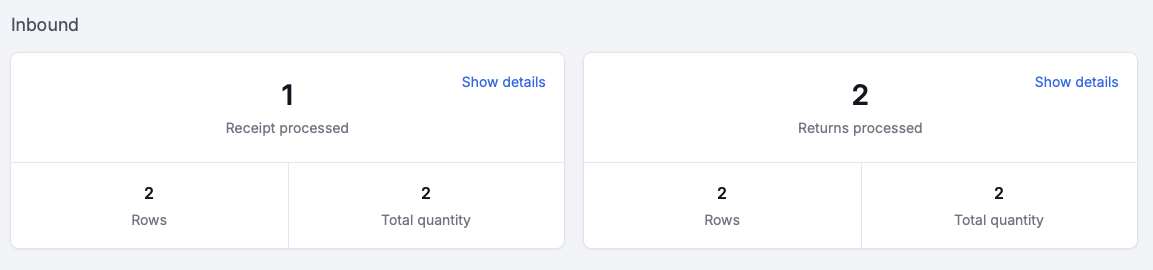
Inbound
Receipts
- Receipts processed: the number of completed receipts.
- Rows: the number of product lines on the receipts.
- Total quantity: the total number of items on the receipts.
- Show details: an overview with details of all receipts.
Returns
- Returns processed: the number of completed returns.
- Rows: the number of product lines on the returns.
- Total quantity: the total number of items on the returns.
- Show details: an overview with details of all returns.
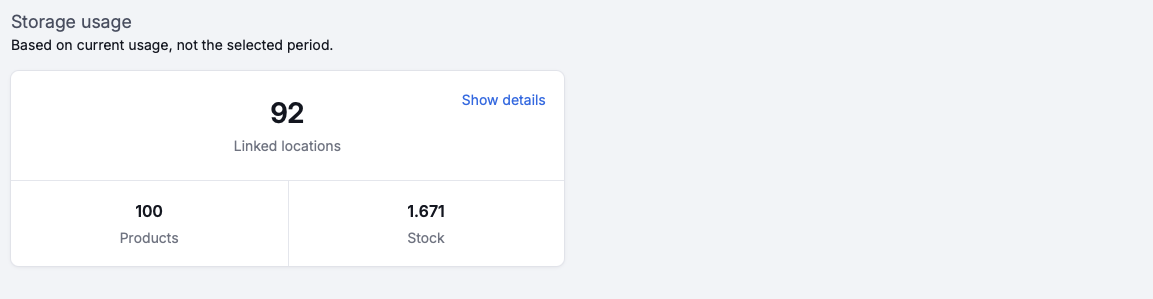
Storage usage
The data in this section is based on current usage, not on the selected period.
- Linked locations: the number of locations currently in use.
- Products: the total number of products at the locations currently in use.
- Stock: the total stock at the locations currently in use.
- Show details: shows two overviews.
- Usage of location types per warehouse.
- Usage of number and type of locations per product.