
Fully automatic shipping labels
How do you make one-click shipping labels even faster? By removing the one click. And now, we’ve truly got fully automatic shipping labels.
As soon as you scan the last product on the picklist with your barcode scanner, Picqer automatically creates the shipment. That shipment is then printed instantly using automatic printing.
Want to select a different shipping method instead? After scanning the last product, you have 2 seconds to move your mouse. This cancels the automatic creation, allowing you to manually choose another shipping method.
Automatic shipment creation is enabled by default for everyone. Prefer to create shipments manually? You can disable automatic shipments in the general settings.
Templates and order confirmations
Alongside the recently launched shipping notifications, today we’re introducing automatic order confirmations. With this feature, Picqer automatically sends an email to your customer confirming that their order has been received.
Dynamic content
You can fully customize the message text, just like with shipping notifications. Including ‘if-then’ conditions that let you adjust the content based on things like available stock or shipping method.
You can edit the text under Settings > Templates > Your template > Order confirmation. If you set the email to "Active" there, it will be automatically sent for every new order.
Prefer to send confirmations manually? That’s still possible from the order page. Just keep the Order Confirmation email in the template set to "Inactive" so it won’t be sent automatically.
Multiple templates
Do you have a Team plan or higher? Then you can now add extra templates. This allows you to create a different template for each webshop, for example.
Each template can have its own layout for documents like picklists and packing slips, and you can customize the content of your emails.
This helps you keep your customers even better—and more beautifully—informed about the status of their order.
Improved product import in Picqer
Our Excel import was already pretty great—if we may say so ;) But we thought it could be even better. That’s why we’ve completely redesigned the Excel import feature for products.
As much as you like (almost)
The previous import feature worked for about 2,000 to 5,000 rows, depending on the number of columns. That was enough for most webshops, but more and more users started splitting up Excel files just to make importing possible. Not the kind of experience we want for Picqer users.
With the new import feature, you can add as many rows as you want. Technically there’s still a limit somewhere, but we haven’t found a file that was too large to import yet.
Progress and cancel option
The new import screen shows you exactly how many products have already been imported and how many are still in progress. So you’ll never be left wondering if Picqer is done yet.
Did you suddenly realize you made a mistake just after clicking ‘Import’? You can now cancel the import at any time to minimize the impact.
Picqer iOS Scanner App
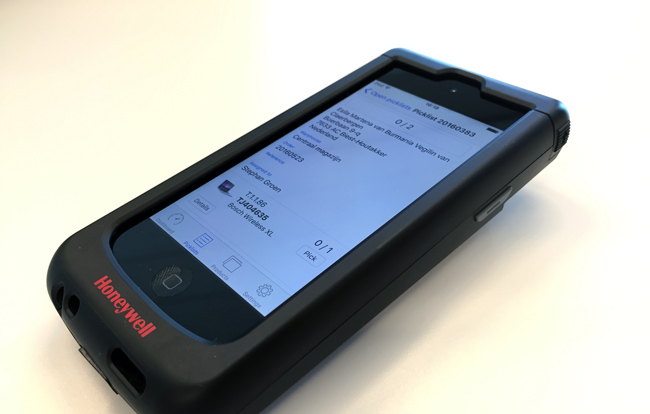
After months of development and testing, it finally arrived: the Picqer iOS App. With this App you turn every iOS device into a mobile hand scanner. Welcome in the era of paperless picking.
Mobile picking
This first version of the App is focused on picklist handling. It is a companion for the people working in the warehouse. They directly see where they need to go, can scan their product and directly create a shipping label. Printing picklists on paper is a thing of the past now.
In the coming months we will add more features to the App. For example support for combined picklists and processing inbound orders.
Barcode scanner
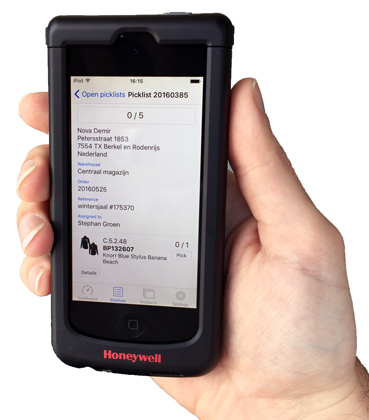 The App has support for Honeywell barcode scanners) which can be added to a iPod touch or iPhone. With this scanner you can effortlessly scan the barcodes of the products. Even in dark warehouses.
Cost effective
An iPod touch with Honeywell scanner may look expensive with 650 euros, but you easily make that money back. With 40 orders a day, you will save the same money with less printing within 6 months.1
Download from the App Store
You can download the Picqer App in Apple's App Store. Sign in with your Picqer username and password and you can start picking. The App is available for all Picqer users for free.
We are very excited about this App. We hope you like it and please let us know what you think of it and what things we can improve.
1 We calculated this based on € 0,10 paper, toner and printer costs per page. 40 orders x 30 days x 6 months x € 0,10 per page = € 720
Connect your Shopify shop to Picqer
Shopify is one of the biggest and well known webshop platforms, but not as well-known in Europe. But this last year we see more and more international webshops using the Shopify platform. So the time was write to build a prober Shopify integration.
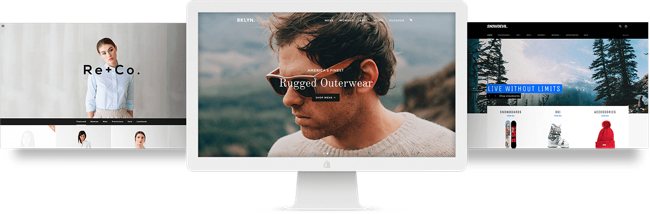
A couple of clients helped us testing the Shopify integration for a few months and gave it their thumbs-up. And today we launch our Shopify-Picqer integration for free for all Picqer users.
Complete integration
The integration with Shopify is as extended as with our integrations with Magento, Lightspeed and WooCommerce:
- we import products from your webshop to Picqer
- we import paid orders from your webshop to Picqer
- shipped orders will be marked as completed in your Shopify shop
- every inventory change will be directly pushed to your Shopify shop
Now you do not have to re-enter any information and all your Shopify orders will be seamlessly embedded in your current warehouse processes.
Shopify App Store
Setting up the integration is easy through the Shopify App Store. Review our step by step instructions in our Dutch knowledge base.
And if you need a hand, we are always happy to help as usual.
Looking for an older article? Browse the full blog archive with all articles.
