
Effective order picking
To ship an order to your customer, it first needs to be collected. This is done through "order picking". Your warehouse employee picks the items from the order out of the warehouse and prepares them for shipping.
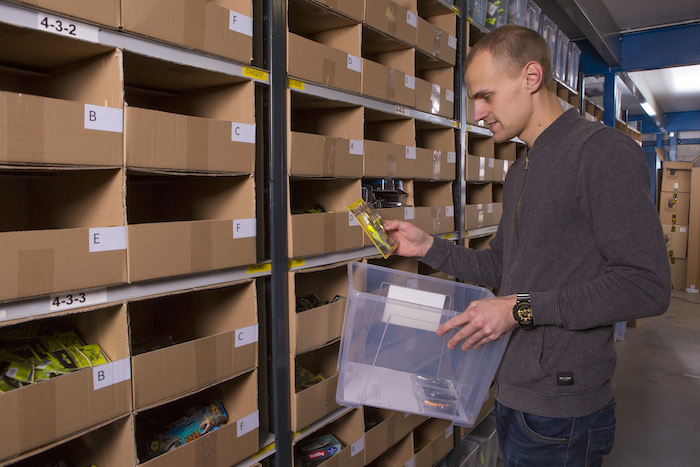
The simplest way to pick orders is to do it per order. You take the oldest order, walk through the warehouse to pick the products, put them in a box, stick a shipping label on it, and you're done. The advantage is that there's little that can go wrong. But it's not the most effective way and can cost you a lot of time. With the guidelines below, you can get started with effective order picking.
Efficient warehouse layout
An order picker walks an average of 60 to 80% of their workday. So it's valuable to limit walking time. You can do this with an efficient warehouse layout. Think about:
- Packing tables are in a central location so you can quickly reach all locations in your warehouse
- Products you sell most often are located close to the packing table
- Clear location markings are present, so you can easily find products
In our knowledge article 'Optimize your warehouse layout' you'll find more tips for an efficient warehouse layout.
Pick multiple orders at once
When you process many orders per day, it's smart to work with batches. With batch picking you collect products for multiple orders at once in one round. The larger your warehouse and the smaller the products, the more benefit you'll have from batch picking.
Batch picking
To be able to batch pick, you start by choosing how many orders you can handle at once. This often lies between 6 and 24, depending on how many orders you can handle at once. Also make sure you have software that can give you one list with all products from these orders in order of warehouse locations. In Picqer, you can easily create a batch in the batch wizard. In our help article you can read how to create a batch.
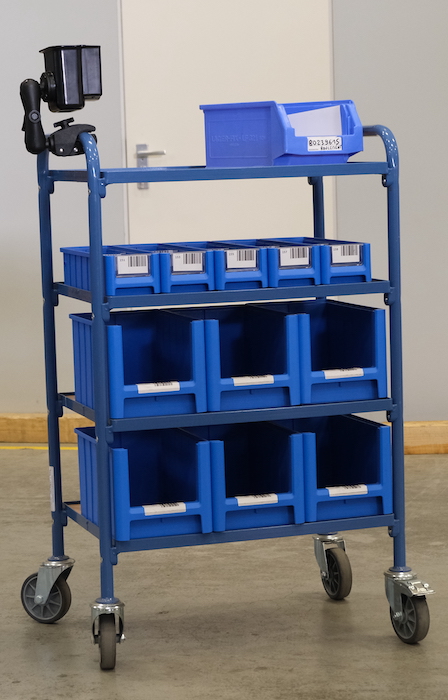
Keep orders separated while walking a batch. It takes too much time to have to sort out all collected products afterwards, so make sure you have a separate container for each of the orders. At the packing table, you can then easily pack and ship products per order. When all orders from the batch are ready to ship, set them aside and start a new batch.
Singles batches
Of all orders that Picqer processes, between 60% and 70% have only 1 order line. That's why Picqer has introduced a method to process these orders extra fast: singles batches. With this, you collect all orders with just 1 product line at once. When you arrive at your packing table with this batch and scan a random product, Picqer immediately shows you which order that product belongs to and the shipping label is printed.
Working independently
Being able to work independently is one of the key elements of a well-running warehouse. This allows you to grow faster, fewer mistakes are made, and it reduces frustration among your warehouse employees. To ensure everyone can work independently, everyone needs to know what the intention is and what all the steps in the processes are. You do this as follows:
- Standardize processes
Agree on standard processes. Picking, packing, and shipping an order is the easiest process to write down and thus a good place to start. You'll notice that once you write it down, quite a bit of knowledge is needed to ship an order correctly. By writing down and standardizing the steps, you can help new employees get started faster. It also helps ensure that the current team works in the same way. - Eliminate exceptions
By having fewer exceptions, your processes become smaller and thus easier to understand and remember, which leads to fewer mistakes. Exceptions also often make the entire process slower. So only make exceptions if you're certain that the entire process becomes better or faster. Read more about how you can eliminate exceptions in our blog. - Eliminate the know-it-all
If there are 1 or a few people in the warehouse who know everything, you'll see that everyone goes to this person with questions. And that's a problem, because what do you do when this person is sick or goes on vacation? So make sure everyone in the warehouse knows how the processes work, how tools work, and where everything can be found. You do this, among other things, by standardizing your processes and printing them out to hang in your warehouse.
Prevent mistakes with a barcode scanner
Making mistakes in an e-commerce warehouse is extremely costly. You can see this when you calculate back how many orders you need to do correctly to cover the costs of 1 wrong order.
Suppose you send the customer the wrong product. A pair of skates worth 150 euros you sent in blue, but the customer had ordered black. Let's see what it costs to fix such a mistake:
- Your customer calls customer service. It takes 15 minutes to apologize, figure out what went wrong, and agree on a good solution.
- The customer service employee spends another 5 minutes processing the mistake in the system and ensuring the customer gets the correct product. So 20 minutes of customer service in total, at 35 euros per hour is 11.67 euros excluding VAT.
- The customer sends the wrong pair back. Shipping costs: 5 euros.
- Processing the returned product is a time-consuming task in the warehouse, this often takes longer than shipping an order. We'll assume 6 minutes, costs: 3.50 euros.
- We now send the correct product to the customer, shipping costs 5 euros. We also have handling in the warehouse again at 2 euros, and packaging material again at 1.50 euros
In total, we've now spent 28.67 euros excluding VAT extra to fix this mistake. Apart from any negative consequences such as a negative review or reduced word-of-mouth advertising.
Suppose we have a net margin of 5% (after deducting marketing costs, purchase costs, processing regular returns, etc.). We then earn 6.20 euros excluding VAT on a correctly delivered order of skates. We now need to deliver 4.6 orders correctly again to financially recover from this mistake.
And this is still with a high-value product of 150 euros. If you make a mistake with an order of 50 euros, you need many more correctly delivered orders to recover from the mistake.
Use barcode scanners
To ensure fewer mistakes during order picking, you can introduce barcode scanners. With a barcode scanner, you scan the barcode of each product during order picking. Software like Picqer then immediately indicates whether you've picked the correct or wrong product.
Scanning barcodes takes a maximum of 5 seconds per average order and provides many advantages:
- You immediately know if you've picked the correct or wrong product. This way you don't send wrong products, keeping your customers satisfied. This leads to better reviews and a greater chance of repeat purchases from your customers.
- Your inventory is always correct. When you send too many or a wrong product to customers, your inventory no longer matches. One product you have less in stock than you think and the other product you have more. This can lead to unpleasant surprises later. By scanning products before you ship them, you're sure the correct product is deducted and your inventory stays accurate.
Many products have a barcode. You can link this barcode in your software. Prevent sending a wrong product to your customer by scanning barcodes of products. Software like Picqer then indicates whether you've picked the correct or wrong product. This is one of the cheapest ways to reduce mistakes.
Get started yourself
With the tips from this article, you can make picking orders even more efficient. Do you also want to optimize your warehouse? Request a free copy of our book 'A warehouse to be proud of' for even more practical tips.
Good warehouse software can also help you pick orders as effectively as possible. Picqer helps you, for example, by automatically creating smart routes and creating batches. Read how Picqer helps you process orders 5x faster.
