Improved security features in Picqer
We have added new features to Picqer to help you secure your account even better. As an admin, you now also have more insight into activities related to information security. Here is an overview of the most important updates.
Two-factor authentication
Two-factor authentication adds an extra layer of security to your Picqer account, making it harder for unauthorized users to gain access.
With two-factor authentication, you will need a verification code in addition to your username and password when logging in. This temporary code is displayed on your phone or another linked device. This way, unauthorized users cannot log in, even if your login credentials are compromised.
Learn more about setting up two-factor authentication on our support page.
Access from trusted IP addresses
In Picqer, you can create a list of IP addresses that you trust—such as the IP address of your warehouse, office, other locations, or home workspaces. You can then specify per user whether they are only allowed to access Picqer from these trusted IPs. This is useful if you want users to log in only from work.
Audit log
The audit log gives admins insight into all events relevant to information security within Picqer. If you suspect misuse of an account or see unusual activity, the audit log helps you investigate what has happened.
Read more about the audit log on our support page.
Updates to the user page
The updated user page provides additional details and actions to improve security.
You can now log a user out from all devices. This is helpful if someone forgot to log out or if you suspect unauthorized access. In the latter case, be sure to change the password as well.
The user page also shows recent stock changes made by the user, and when and from which locations they have logged in. This gives you a quick overview of any potentially suspicious activity.
With these new tools, you can better secure your Picqer account. Need help with setup? Get in touch with us.
WooCommerce + PostNL support
As of now, we support the official PostNL plugin for WooCommerce. The plugin includes support for the following options:
- Pickup locations in the Netherlands
- Pickup locations in Belgium
- Evening delivery
- Letterbox parcel
- Delayed delivery date
Please note: options such as signature, insured shipping, no delivery to neighbors, age check and return if not home are not passed from the shop.
You can find the PostNL installation guide here.
For more information about our WooCommerce integration, visit our support page.
Follow the Warehousing e-learning
In collaboration with Thuiswinkel.org, we've created the Warehousing e-learning course. You can follow the course for free on e-academy.com.
What you’ll learn
The e-learning walks you step by step through running your own webshop warehouse successfully.
You’ll learn, among other things:
- Why you need a warehouse and how it plays a key role in delivering your webshop promises
- How to identify the characteristics of a good warehouse and create an effective setup
- Why it’s important for everyone in the warehouse to work independently and how to support that
- Why preventing errors is more important than speed and how to calculate the First Time Right percentage
- The key methods to improve warehouse speed
- How to use these foundational principles to run your warehouse more efficiently and effectively
Test your knowledge
After completing the e-learning, you can take a final test. The test takes about 15 minutes, and if you pass, you’ll receive a certificate.
Ready to start the e-learning? Visit e-academy.com
How your warehouse delivers on 5 key promises of your webshop
As a webshop, you make many promises throughout the customer journey. Think of messages like “Order before 11 p.m., delivered tomorrow” or “discreet packaging.” These promises appear on your website, in ads, and through customer service. Most of them are fulfilled in your warehouse.
That’s why your warehouse team must be aware of the promises made to customers. In this blog, we’ll show you how to fulfill five key promises through your warehouse operations.
1. Ship the correct product
The most important promise is delivering the right product. Once a customer places an order, a warehouse worker picks, packs, and ships it. Mistakes can happen during this process.
Products that look similar are often stored next to each other. For example, two green sweaters in different sizes. A moment of distraction can result in the wrong product being shipped. Using a barcode scanner and product codes helps prevent these errors.
Many warehouses use batch picking to process more orders at once. This increases efficiency, but also increases the risk of mixing products from different orders. To avoid this, it's essential to verify products right before packing, preferably using a barcode scanner. This helps ensure each product goes to the right customer.
2. Ship to the correct address
Once the correct product is packed, it needs to be delivered to the right location. Before printing a shipping label, make sure the address information is correct. Sometimes the home address is printed instead of the selected pickup point. Double-check that your system handles this properly.
Human error can also occur if multiple shipping labels are printed at once and get mixed up. It’s best to print labels one by one and immediately attach them to the correct package.
3. Ship at the promised time
Customers often choose webshops that can deliver quickly. Many stores now promise things like “Order before 11 p.m., delivered tomorrow” or “Same-day delivery.” To meet these expectations, several things must be well-organized:
- Inventory management must be accurate so that products are truly in stock.
- Enough staff must be scheduled to handle peak order volumes.
- Delivery partners must be reliable and offer the required pickup times and capacity.
Sometimes customer service makes special delivery promises, especially for pre-orders. For example, promising that an item will ship today. The warehouse must then process the incoming goods quickly to keep this promise.
How to process returns efficiently
In recent years, we have seen a significant increase in online orders, with a peak of 83% growth in 2020 compared to 2019. More shipments also mean more returns. For many online retailers, processing returns is a pain point. Returns take time and mistakes often happen during the process.
By critically evaluating every step of your returns process, you can implement optimizations that make processing returns faster and more accurate. Using return solutions like Returnless and Sendcloud helps automate parts of the process, saving time and reducing errors.
Prevent returns
The least time-consuming return is the one that never happens. You can prevent returns by ensuring the product information on your webshop is as clear and complete as possible. This helps customers avoid ordering products that don't meet their expectations. Make sure specifications are accurate and complete: What are the exact dimensions? What material is it made from? How much power does it use? And so on.
Photos should give a clear representation of the product. This includes showing accurate colors and scale. If you sell clothing, provide context like “Model wears size M and is 180 cm tall.”
Place return info in the right spots
Of course, you can never eliminate all returns. In that case, the returns process should be as smooth as possible. A return begins with the customer finding the return instructions. Clearly placing return information in multiple places prevents confusion and unnecessary questions to your customer service team.
Include return instructions in the order confirmation email, on a dedicated section of your website, and inside the package on the packing slip or as a separate return form.
Use a smart return form
In a digital world, paper return forms feel outdated. You can streamline your return process by using a smart return form on your webshop. This allows many parts of the process to be automated, including sending automated email updates about the return status.
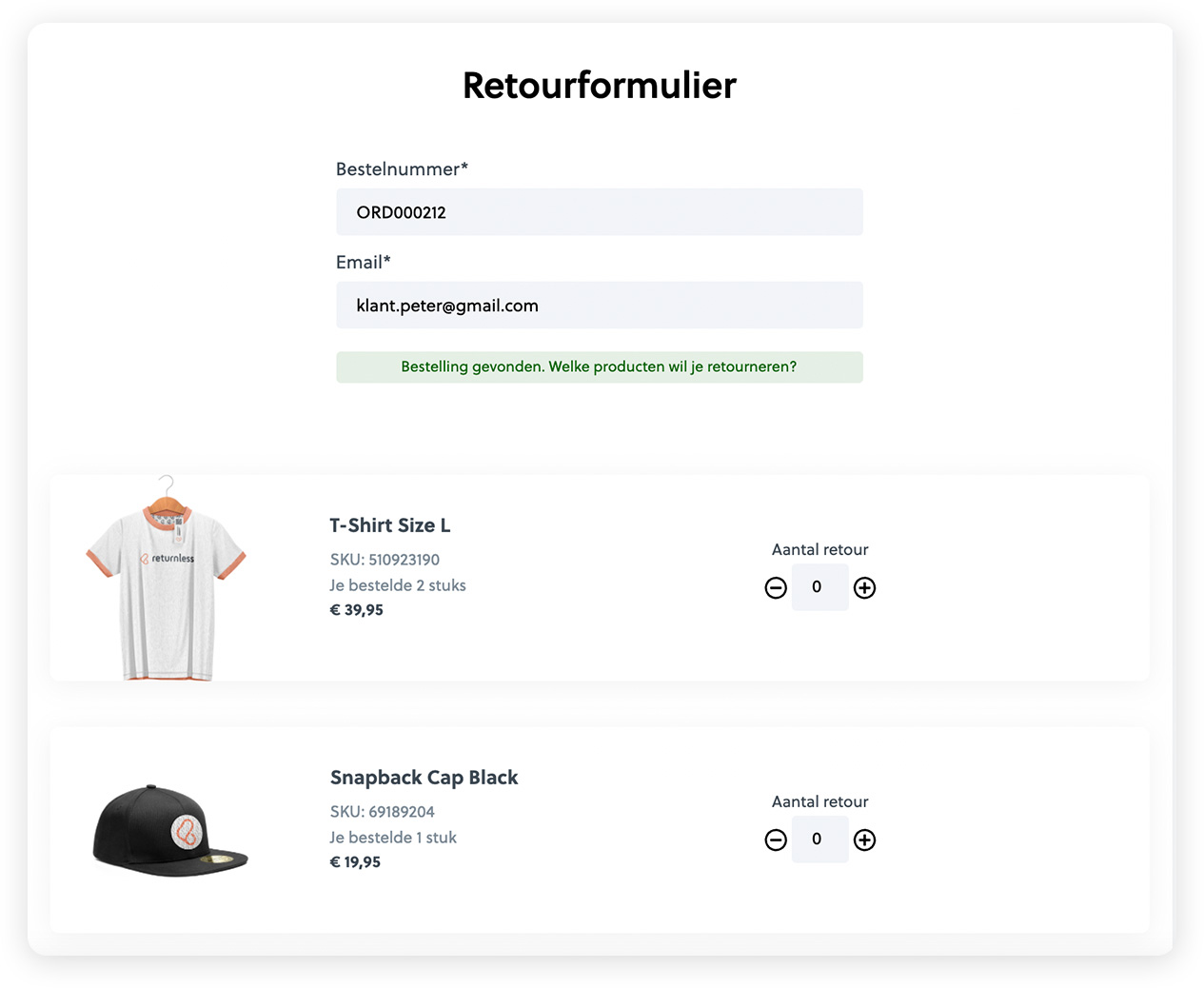
You can build your own smart return form integrated with your warehouse software, or use ready-made solutions like Returnless or Sendcloud. With these tools, your customer can easily register a return. After entering their order number and email address, the product data is automatically retrieved. The customer selects the return reason, and based on custom triggers you can offer specific responses:
- If a product is too small, offer the same product in a larger size.
- If the product is damaged, request a photo first so your team can assess it remotely.
This gives you better insight into incoming returns and may prevent unnecessary shipments.
Looking for an older article? Browse the full blog archive with all articles.