
Busiest days for online stores in 2022: Black Friday grows, Christmas rush declines
The new year has begun, which means it’s time to look back at the past year. After two years in which COVID-19 had a major impact on the number of online orders, 2022 was more stable and predictable. This trend is clearly visible in the data. We compared the average number of orders across all Picqer user webshops in 2022 with 2021. Below, we reflect on the differences and highlight the busiest days of the year.
Busiest days of 2022
As usual, the top 10 busiest days in 2022 were largely dominated by Black Friday week and Cyber Monday. We also saw plenty of activity in the weeks leading up to Christmas. However, there was a shift. Last year, the Monday before Christmas was the second busiest day of the year. This year, it ranked fourth. Cyber Monday and the Sunday after Black Friday moved up to second and third place.
Comparing Black Friday week and Cyber Monday with the previous year, we saw a 3.79% increase. Even though more businesses are choosing Green Friday and intentionally opting out of Black Friday, there were still more orders placed.
In the 14 days leading up to Christmas (10 to 23 December), there were 4% fewer orders compared to 2021. Interestingly, physical stores saw record levels of debit card payments on the Friday before Christmas. This suggests that more people may have chosen to shop in physical stores for their holiday purchases.
Top 10 busiest days
Here are the 10 busiest days of 2022:
| Day | Date | Order volume |
|---|---|---|
| Black Friday | 25 November | |
| Cyber Monday | 28 November | |
| Sunday (Black Friday week) | 27 November | |
| Monday | 19 December | |
| Thursday (Black Friday week) | 24 November | |
| Wednesday (Black Friday week) | 23 November | |
| Monday (Black Friday week) | 21 November | |
| Monday | 12 December | |
| Tuesday | 20 December | |
| Tuesday | 13 December | |
| Average day 2022 | ||
| Average day 2021 | ||
| Busiest day 2021 |
20% fewer orders in Q1
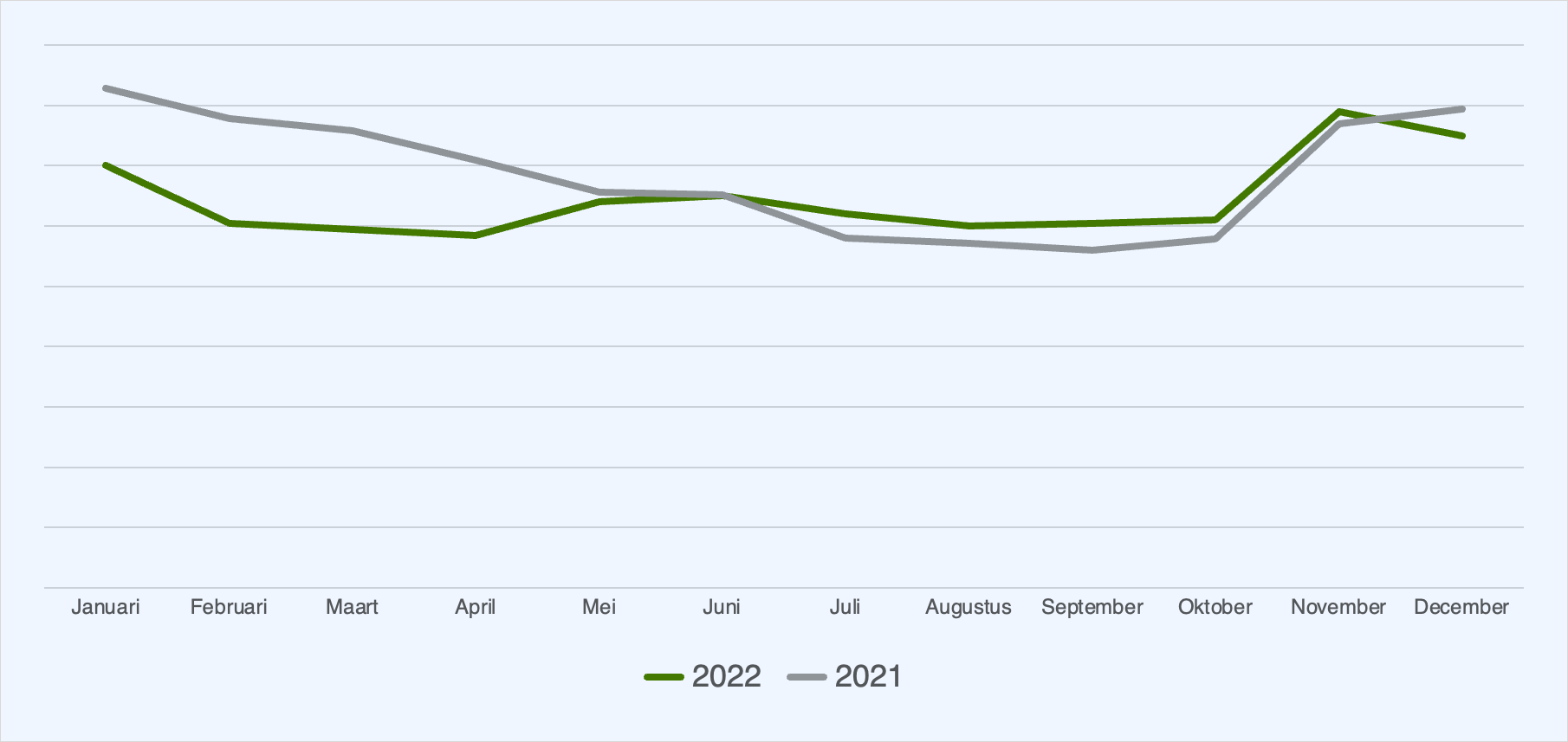
Due to COVID-19 restrictions, many stores had to close in the first quarter of 2021, which led to a sharp increase in online orders. In 2022, stores remained open. This resulted in a much more stable trend and a visible 20% decline in orders in Q1. From July to November 2022, we saw more orders than in 2021. In December, the number of orders once again dropped below the previous year's level.
New: GLS integration with Picqer
You can now connect the carrier GLS to Picqer.
What is GLS?
GLS is one of the leading carriers in Europe. GLS offers a wide range of shipping services that you can combine with additional options.
Every day, GLS delivers goods for thousands of businesses to both commercial and residential addresses, with a strong focus on delivery quality and fast turnaround times.
Once you connect Picqer to GLS, you can create shipping labels with a single click, and they are automatically pre-registered with GLS. Share Track & Trace details automatically and automate options such as multi-parcel shipments, Saturday delivery, express shipments, parcel shop delivery, adding return labels, and more.
Get started
Not yet a GLS customer? Visit the integration page for more information.
Already have a GLS account? Check out the integration guide and easily connect Picqer to your GLS account.
New: Returnista integration with Picqer
You can now connect the Returnista returns solution to Picqer.
What is Returnista?
Returnista is a returns solution that helps automate and optimize your returns process. Through a branded return portal, customers can initiate returns themselves. They only need to enter their order number and email address. The order is retrieved in real time from Picqer. Customers select which items they want to return, the reason, and which carrier they want to use. A return label is generated instantly. All return information is visible both in your return portal and directly in Picqer. This allows you to process returns quickly and easily.
Once Picqer is connected to Returnista, returns are automatically pre-registered in Picqer. When a return package arrives at the warehouse, you can scan the barcode on the shipping label. After inspecting the returned items, the stock is automatically updated.
Get started
Not yet a Returnista customer? Visit the integration page for more information.
Already have a Returnista account? Head to Returnista.nl to have the integration set up by Returnista.
New: e-tailize integration with Picqer
You can now connect the e-tailize platform to Picqer. The integration is developed by the e-tailize team and is already successfully used by several customers. With e-tailize, you can centralize and automate your product, stock, and order management across more than 65 integrations (such as Amazon, Bol.com, and others). The data analysis module provides valuable insights for your omnichannel strategy.
What is e-tailize?
e-tailize is a Dutch company focused on marketplaces. They offer smart solutions to help you achieve better results on marketplaces. With e-tailize, you can benefit from the following features:
- Easily publish products on marketplaces from one interface
- Complete PIM system specifically built for marketplace management
- Automated order handling (for example, forwarding orders to Picqer)
- Centralized inventory management
- Data analysis functionalities
Once you’ve connected Picqer to e-tailize, you can centralize all marketplace and webshop orders and synchronize them in real time with Picqer. Stock changes in Picqer are also synced in real time with e-tailize, and from there to marketplaces and webshops. You can even combine multiple marketplace accounts in Picqer.
Get started
Not yet an e-tailize customer? Visit the integration page for more information.
Already have an e-tailize account? Go to e-tailize.com to connect Picqer to your e-tailize account.
New: Veloyd integration with Picqer
You can now connect the delivery and shipping platform Veloyd to Picqer.
What is Veloyd?
Veloyd is an all-in-one courier and shipping platform. It offers a complete suite of tools to efficiently manage all transportation flows, whether local or international. Optimize routes for local couriers, use the user-friendly app to carry out deliveries, and ship parcels with external carriers.
Once you’ve connected Picqer to Veloyd, customers automatically receive Track & Trace emails as soon as an order is processed. Use rules to automatically apply the correct shipping profiles and delivery options based on the order contents. Detailed shipping information is clearly accessible within Veloyd.
Get started
Not yet a Veloyd customer? Visit the integration page for more information.
Already have a Veloyd account? Check out the integration guide to easily connect Picqer to your Veloyd account.
Looking for an older article? Browse the full blog archive with all articles.
