New in our team: Kasper
Hello everyone, my name is Kasper Hägele, and as of March 2019 I work at the support department of Picqer. Together with the support team, I make sure that everyone is helped in the Picqer way: open, personal & assistant.
I have a lot of interest and experience in the e-commerce sector, which is, of course, helpful at Picqer. It is also exciting to deepen my knowledge about warehouses of webshops, and I look forward to helping our clients reach the next level with the Picqer's software.
Before I started at Picqer, I helped a lot of people with setting up their webshop at a Dutch webshop platform for about 5 years. Also, at a client services company, I helped a lot of well-known webshops with the implementation of live chat and support software. Now it's time to support the warehouses of webshops at Picqer, full of intelligent IT and smart solutions. A real challenge!
I live together with my wife Nivine in Nijmegen. We have two daughters, Haper (2) & Jazz (7 months). Musical names that probably give away that I am a huge music lover. In addition to music, I have a lot of other interests such as the internet, travelling and cooking. You can also find me regularly on Twitter.
I would love to talk to you about your warehouse and how you can organise this even better with Picqer. Nice to meet you :-)
New in our team: Johan
My name is Johan Schutten and I started on the 1st of January at Picqer as a Support Guru. A beautiful name for the work I love to do: supporting clients!
I graduated in 2010 as a journalist at the CHE in Ede. I was able to directly start at a well-known magazine about computers and tech. After some wandering, a few years later I landed in the dynamic world of client service in which I work for four years now.
The past two years I worked with a lot of fun at the township of Apeldoorn and Reden. I answered 1001 questions through telephone and e-mail from civilians and companies. The work was good and diverse but I did miss some challenge. This I found at Picqer. Picqer also fits well with my philosophy that software should be easy to use.
In my free time I love to go out into nature to photograph, cycle or walk. And when I want to I work on my debut novel. I realise that not everyone is as lucky as I am. Because of that I am involved with a civil society that helps people with a little to no network.
As Support Guru I help users of Picqer by answering (technical) questions and solve problems. A lot of answers you can already find on our support pages, which I will continue to develop and update. Do you feel like you miss something? Then I would love to hear from you. It's my goal at Picqer to deliver the best possible support to you Picqer users!
New in Picqer: Packing stations
On the 28th of February we introduce Packing stations. With this we make it easy to select the right printer for the packing station you are working at.
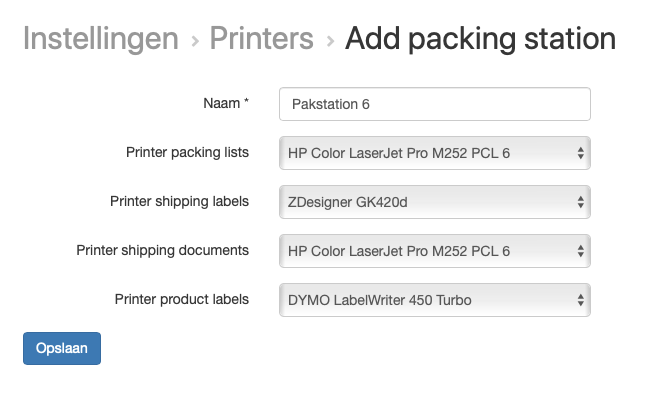
For each packing station you select which printer you want to use for packing slips, shippping lables and product lables. Because of this you only have to find the right printer once and is switching packing stations very easy.
Switching packing stations
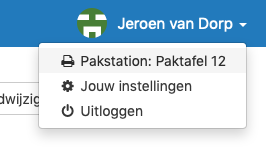
Each user, administrator or not, is able to easily switch from packing station. You do this by clicking on your name in the top right and select your packing station.
Setting up Packing stations
We have converted your existing printing configuration to packing stations. This you will find under Instellingen > Printers.
If you have more packing stations in use, you can add them yourself.
Live on the 28th of February
By now we have converted all configurations to packing stations. You can now choose packing stations and add new packing stations.
Documentation about packing stations you can find on this support page.
New on Picqer
In the past weeks we have added a lot of improvements to Picqer, so time for an update.
Rules
By now almost everyone uses Rules. Some only use 1 or 2, others use dozens of rules to automate as many exeptions as possible.
- Rules for picklists can now also be used for return-picklists. You can also add a condition for when a rule is only triggerd for picklists from orders or only from returns.
- Snoozing through rules can now be done for every desired period, as you now can enter the amount of days untill a picklists has to be snoozed.
- And as of today: add extra tags to orders with Rules. A powerful combination with filters.
Shipments
You can now search through shipments by tracking code. Easy for when your carrier has a problem with one specific package.

For MyParcel we added support for "Age check 18+" and we now support pickup points with WooCommerce.
For PostNL we support multi-colli, so you can send multiple packages in one shipment. We also added the Cargo products "Pallet" and "Parcel Plus".
For Sendcloud we support pickup points with Magento 2 through the official Magento 2 plugin of Sendcloud.
Purchasing
- In the smart purchasing advice for new products we now look at the day they were in stock for the first time, beside the date of the first order, to create an improved starting advice.
- You can deactivate suppliers when you don't use them anymore, so you can clean up when necessary.
- When you print product labels from a purchasing order you can choose on which printer you want to print these.
Orders
- At the creation and editing of an order you can now switch between a customer and a guest order. Also easy when duplicating an order.
- You can now transfer expected orders to a concept order or cancel completely, when you don't want to wait on a status change in the webshop.
Picklists
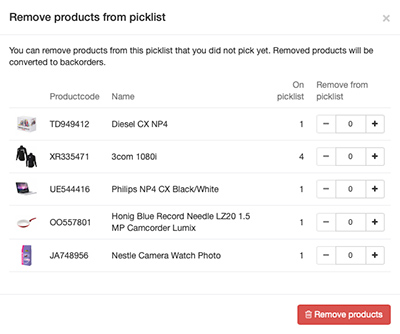
- There is a new interface to delete products from picklists. So you can remove multiple products from a picklist at once.
- Picklist batches also takes picklists of returns into account, so you can use them the same as the picklists of orders.
API
- Through the API you can now add suppliers and edit them through the API. (documentation)
- For all webhooks we report the time of the event in "event_triggered_at", handy if you sometimes receive or process webhooks a bit later. (documentation)
- Webhooks are added for purchase orders and for movements. (doucmentation)
Fulfilment
For fulfilment we have added the following changes in the fulfilment-portal:
- Fulfilment clients can see combined products and see the parts of combined products.
- Returns are now included in the fulfilment-portal, including the history of statuses.
New in the team: Sabina
 Hi there! My name is Sabina Vissers and I’m new in the Sales department of Picqer. Together with my colleague Bram, I aspire to help webshops take back control over their warehouse and improve their inventory management, which will in turn allow them to give their customers the best service possible.
Prior to this I have worked as an independent entrepreneur in the music business for 10 years. Among others as a booking agent, as a publicist for jazz venues, festivals, record labels, international recording- and touring artists and as a coach for students in music conservatories.
Even though working at Picqer seems worlds apart from my previous occupation, for me, the common ground is based on the sense of fulfilment I get from helping people to be more efficient and get better results. Whether these people are students, who I help to reach a wider audience and achieve more with their acquisition efforts or whether they are webshop owners, who I help to work more efficiently and accomplish more with less effort. For me the satisfaction is the same: I’m happy when you’re happy! Picqer allows me to do this within an amazing quality focussed team. So in short: what else could I possibly wish for?
Well... I hope we will speak with each other soon!
Looking for an older article? Browse the full blog archive with all articles.