
Process orders with the same product in bulk
A newly released book or an exclusive sneaker that has finally arrived: these are products that customers have been looking forward to. When they're in stock, orders start pouring in.
These orders lead to many picklists with the same product and often the same quantity. Picking and packing becomes a routine task, but because of the large number of orders, it’s not a quick job. Picqer is here to help even more, as it's now possible to process singles batches in bulk.
Whether it's popular new products, bestsellers that are always ordered in large quantities, backorders that are available again, or pre-orders that have just become ready: with bulk processing, you're done in no time.
Gather all products with the same picking container
It already saves a lot of time when you process orders in a singles batch in Picqer. Picqer then combines all picklists with the same product (or the same quantity of the product). This means you only have to go into your warehouse once to gather all the products with the same picking container. After that, you process all the products at the packing table, list by list.
Picqer processes all picklists for you with one click
But it can be even faster. With bulk processing, you no longer need to process a singles batch picking list by picking list. With one click, Picqer now processes all picking lists (with the same product and quantity) at once and prints the shipping labels. This saves you many mouse clicks and therefore time.
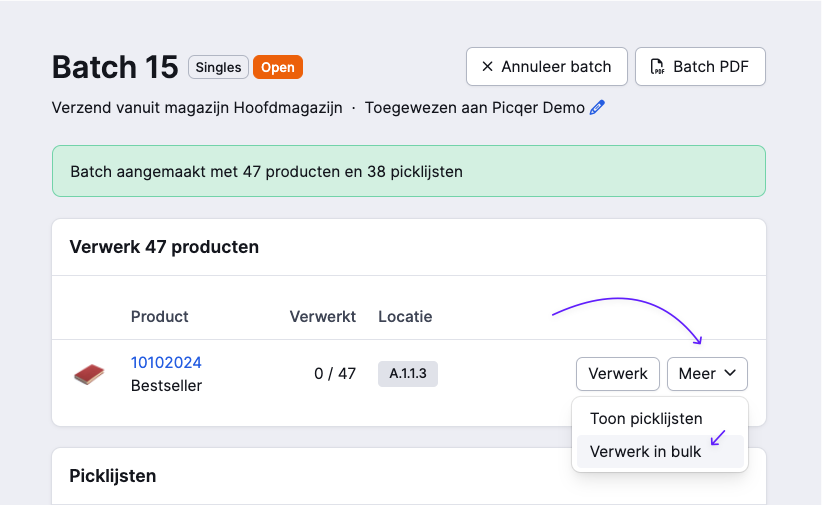
In each batch, you only process picklists with the same number of items per order. After you select which picklists with the same number of items you want to process, Picqer ensures that for each picking list:
- the products are picked,
- the shipment is created,
- the shipping label is printed,
- the picklist is closed,
- your webshop is notified of the processing.
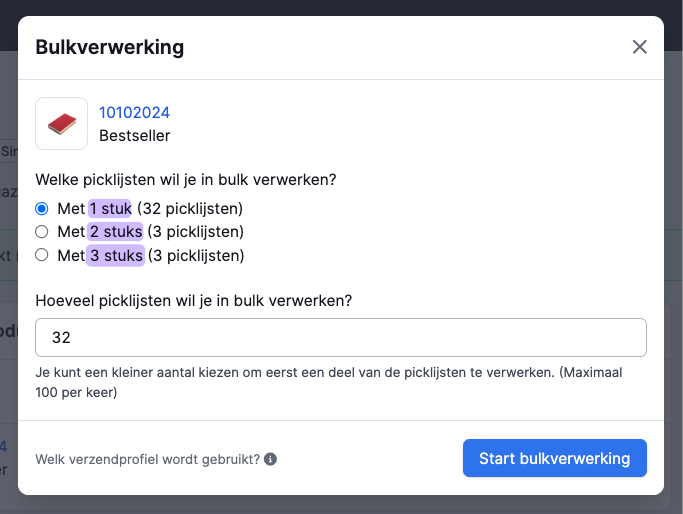
Packing without thinking
Since the batch is sorted by picklists with the same number of items, you can pack without thinking. You put the same number of products in each package, and it doesn't matter which shipping label you use. You’ll have the orders processed in no time!
Set the correct shipping profile before you start
Picqer uses the pre-selected shipping profile to process the picklists. If that is not set, the default shipping profile is used. It's also better if no extra documents are required, such as packing slips or customs papers. That way, you don’t have to worry about them during packing.
Using bulk processing
Admins and users with the right to "Manually mark products as picked" can use bulk processing. Currently, bulk processing is only available on the new picklist and batch pages. Not using these yet? Enable them under Experimental Features.
Join us for Meet & Grill 2024
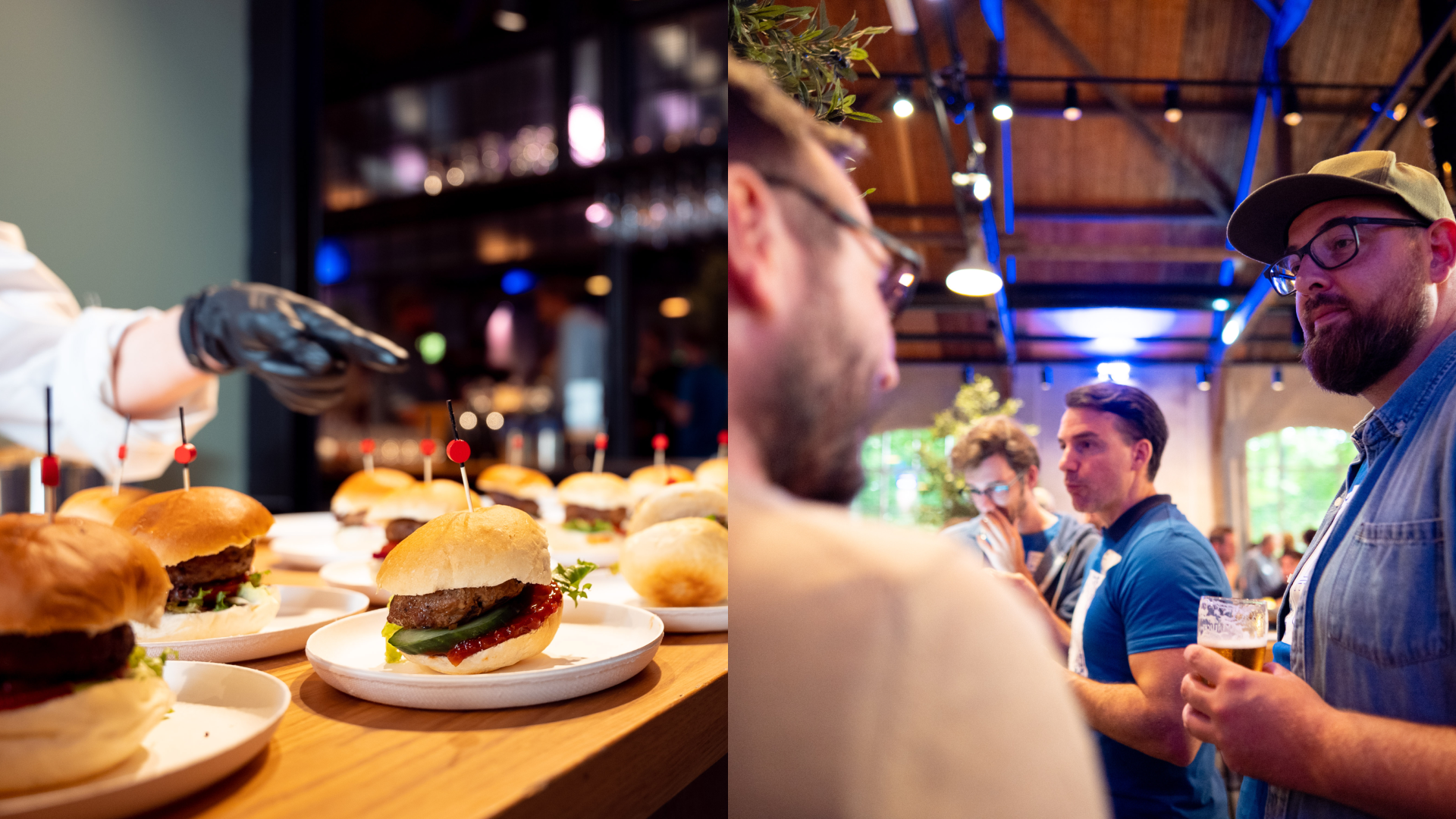
On Wednesday, September 11, 2024, we’re hosting the annual Picqer Meet & Grill. It’s the perfect opportunity to catch up, get inspired, and enjoy a great meal with fellow e-commerce entrepreneurs. This year, we’ll gather at rooftop bar Kleurstoff in Amsterdam.
Schedule
The main goal of the day is to meet other webshop owners and learn from each other. There will also be a short plenary session.
| 3:00 - 3:45 PM | Welcome We’ll greet you at Kleurstoff in Amsterdam with a drink. |
|---|---|
| 4:00 - 5:00 PM |
Presentations
|
| 5:00 - 9:00 PM | BBQ & Drinks Enjoy drinks, networking, and sharing experiences while we fire up the grill. |
Location & directions
Rooftop bar Kleurstoff is located near the A9 and Johan Cruijff ArenA in Amsterdam-Zuidoost. It’s easily accessible by train, metro, and car.
Kleurstoff | Hogehilweg 20, 1101 CD Amsterdam
Public transport
From Bijlmer ArenA station, it’s about a 10-minute walk to Kleurstoff. Or take metro 50 or 54 toward Gein and get off at Bullewijk — from there, it’s just a 2-minute walk.
Parking
There are several parking areas within walking distance of Kleurstoff, including: Hogehilweg 8, Hogehilweg C, and Hettenheuvelweg 41.
New receipts: receive products more smoothly and quickly
We have made receiving a purchase order a lot smoother. The first people using it have told us that receiving is now much faster. Super cool! That was our goal.
In our excitement, we enabled the new version for everyone on July 22 without informing you first. That was the wrong order, sorry about that. We’d now like to explain how it works.
Get in the flow
Receiving a purchase can take hours, especially with a large shipment. In the new receipts, you add products directly to the stock, product by product. This way, your colleagues can start working with the received products right away while you unpack the next box. Since you no longer have to sort out all the products first, your workspace stays organized.
Receiving products is now even faster and much more organized. Since the stock of each product is updated immediately, we can directly ship the pending backorders of the product we've received.
Receiving in Containers
Since you add products directly to stock in the new receipts, you can now also receive them in a container. This is a temporary stock location for moving products internally. A container can be anything, such as a crate, rolling cart, or a series of small bins.
Always know where your products are
In an ideal workflow, you always want to know where your products are. This starts when you first see the products, as soon as you take them out of the box or off the pallet. For the time between registering them and putting them away in their final location in your warehouse, a container is ideal.
At the receiving table, you register the products in the container, such as a cart or crate. Your colleague can then take that container to the warehouse to store the products. By using the container, everyone can see, at any time, where the products are.
Picqer has done a great job with the receipts, and the result is impressive. Processing incoming products is now even smoother!
How does it work?
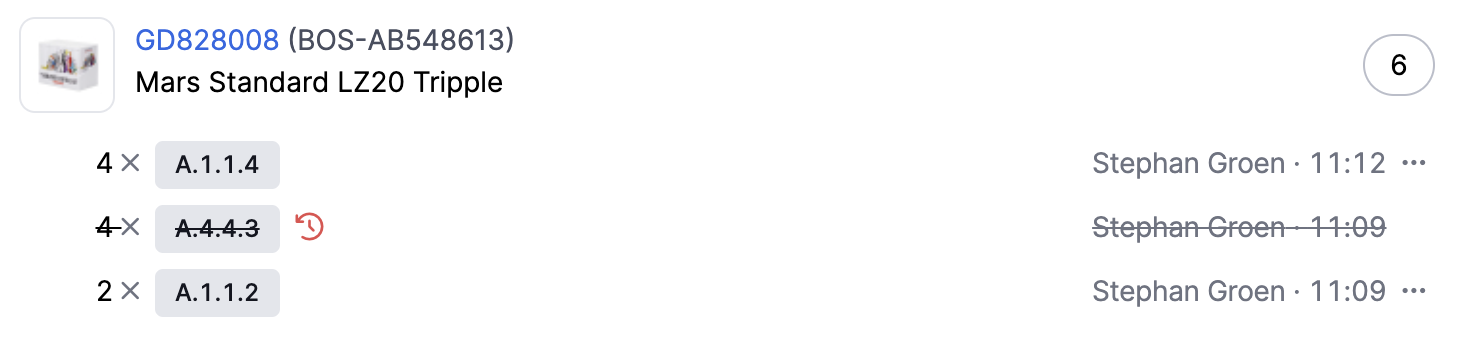
The screen is divided into two parts: the products you expect are at the top, and the products you have already processed are at the bottom, in a logbook.
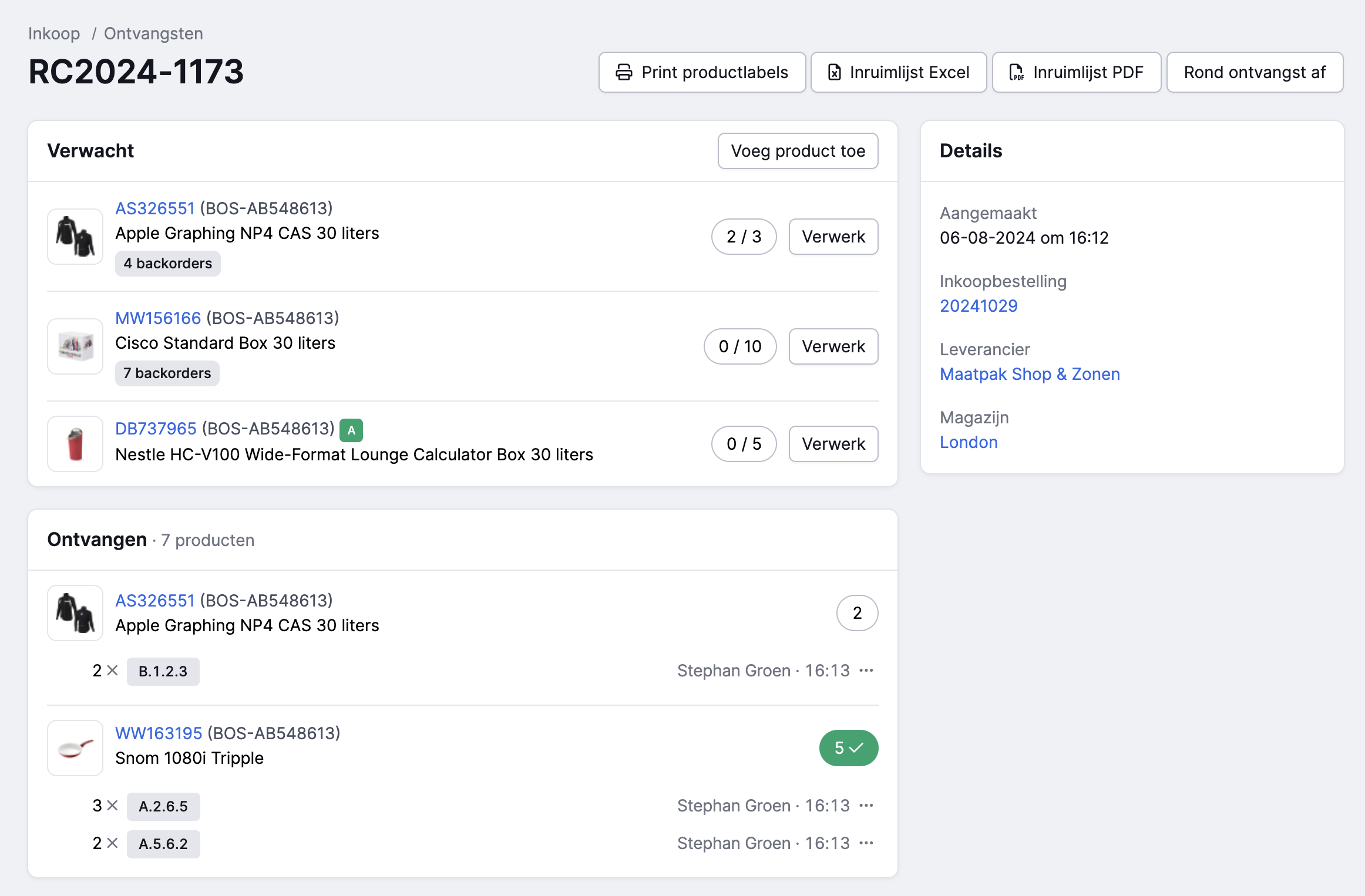
The product you scan or select opens in a pop-up with all the information and more options. This allows you to easily check if the product is correct and receive it at the right location. By displaying the product you currently have in your hands in a pop-up, we were able to remove many options from the overview, making the interface cleaner.
Once you receive the product, it is immediately added to your stock. This means it can be used right away for picklists, backorders, or for internal transfers.
This workflow is the same on the web as in the mobile app.
Distributing products across multiple locations and containers
During receiving, you can directly distribute a product across multiple locations or containers. For each product, you choose where to register it and the quantity. The quantity you have already registered moves to the logbook. At the top, you can see how many you still need to receive. Even if multiple colleagues are working on a receipt simultaneously, you can see who has received which product at which location.
You can register products directly at a pick or bulk location, or first in one or more containers and then transfer the stock from the containers to the permanent locations. From now on, you transfer stock after receiving from the container instead of from the receipt. This way, you can add multiple receipts or returns into the same containers and then scan the container to easily transfer the stock to the final locations in your warehouse.
Correcting mistakes
Did you make a mistake while registering? Since products are now added directly to stock, adjusting quantities is more difficult. That's why we've added a ‘reverse’ button, which moves the product back up so you can receive it again.
API changes
The API has also been updated to the new receiving method. We have kept the data as consistent as possible, especially for closed receipts, as these are most often used in the API. However, the receiving process has changed for the new workflow. View the API changes.
Changelog
Changelog: Redesigned order page and personalization of the fulfillment portal
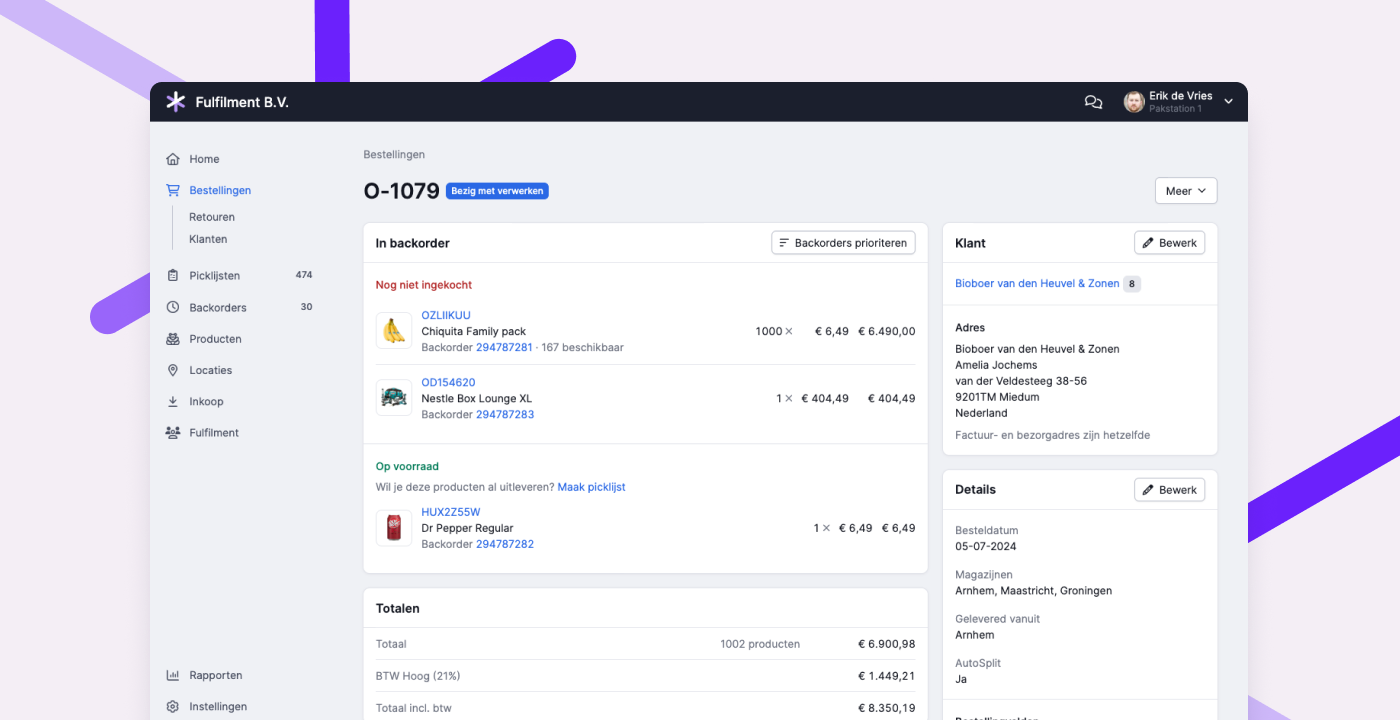
Renewed order page
We have updated the design of the order page. In the new layout, products are grouped by status. This way, you can see at a glance what still needs to be purchased, what you expect to receive (and when), and what is already available or shipped. This allows you to quickly answer the customer question: "When can I expect my order?" Editing draft orders can now also be done directly on the page itself.
You can try the new design through Experimental Features, or by clicking "Try the new design" at the bottom of the order page.
Customizing the fulfillment portal
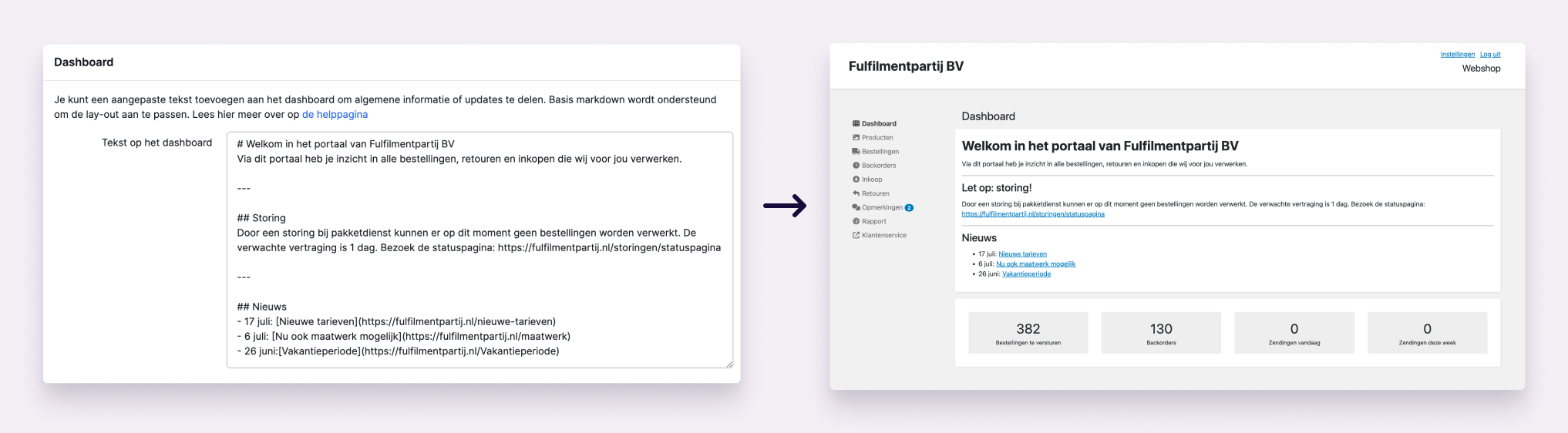
As a fulfillment company, you can now add your own text at the top of the dashboard in the fulfillment portal. This makes it easier to communicate with your customers. Use the text to share general information such as contact details and opening hours, or important updates like disruptions and other news. You can also add your own link to the menu in the portal, for example, directing customers to your website or customer service. Read all about it in this help article.
Other improvements
- The sounds during scanning are now even clearer and more reliable.
- The pages for creating batches and managing batch presets are now more organized. Recommended read: Create batches faster with presets
- When a fulfillment customer is mentioned via the app, these comments are now visible by default in the fulfillment portal. Additionally, we now show the open picklists under an order if a comment is placed that is visible to the fulfillment customer.
- In the API for receipts, it is now possible to request all receipts for a purchase order, including receipts linked to multiple purchase orders.
- In the API for products, it is now possible to filter by product type.
Create batches faster with presets
When fulfilling orders, you want to pick items in your warehouse as efficiently as possible. In Picqer, you do that using batches: you pick products for multiple orders at once, following a logical route through your warehouse. Before you begin your round, you create a batch in Picqer so the software knows which pick lists can be combined for simultaneous picking.
Save time with the right settings
You already save a lot of time by picking products in a batch, but you'll work even faster if the software requires minimal setup. Chances are, you use certain types of batches frequently. That’s why Picqer lets you create presets for batches. Just take the time to configure a preset once, and after that, you only need to select it to create a batch. Picqer will automatically fill in all the fields for you.
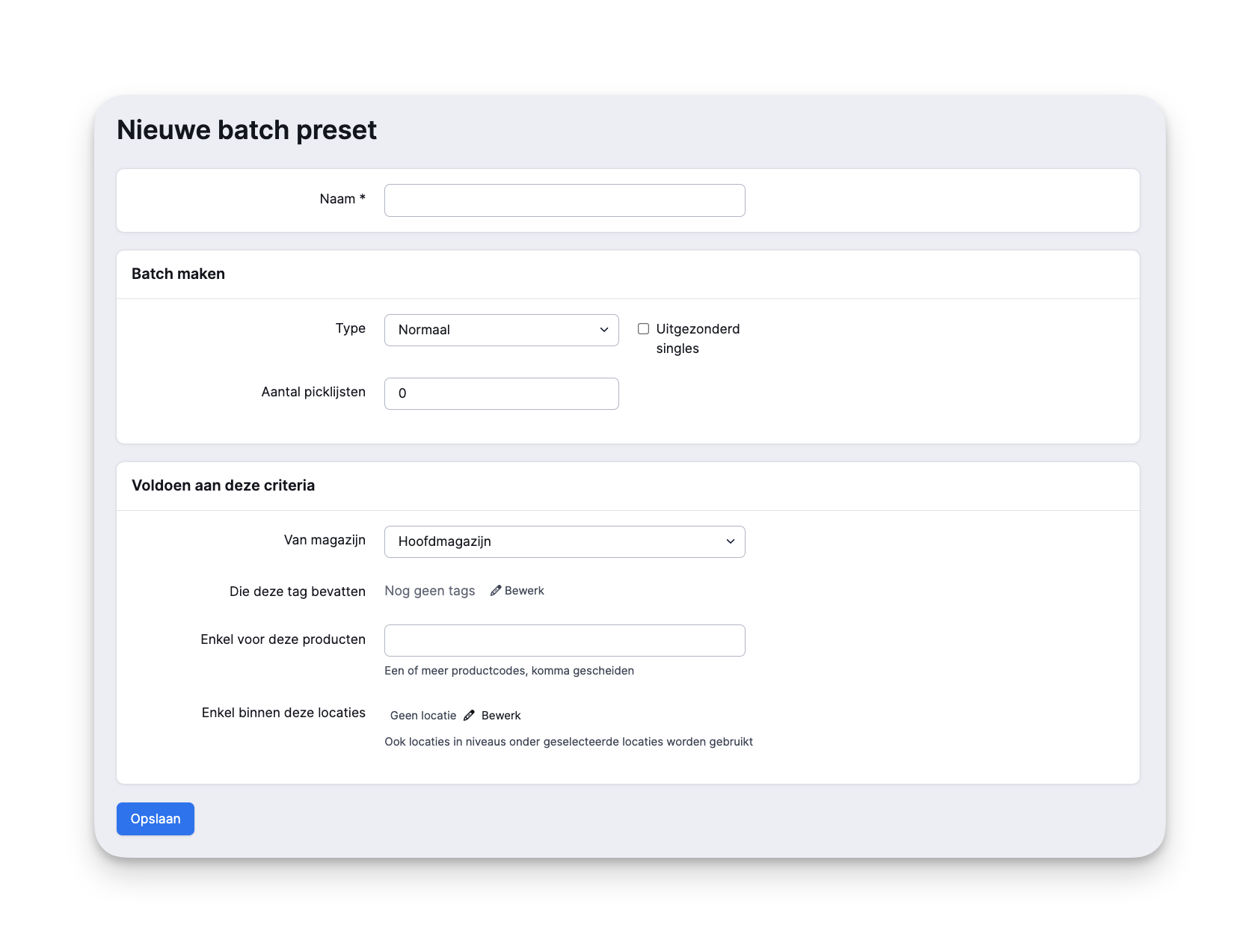
How to create a batch preset
Only administrators can create presets, but all users can use them.
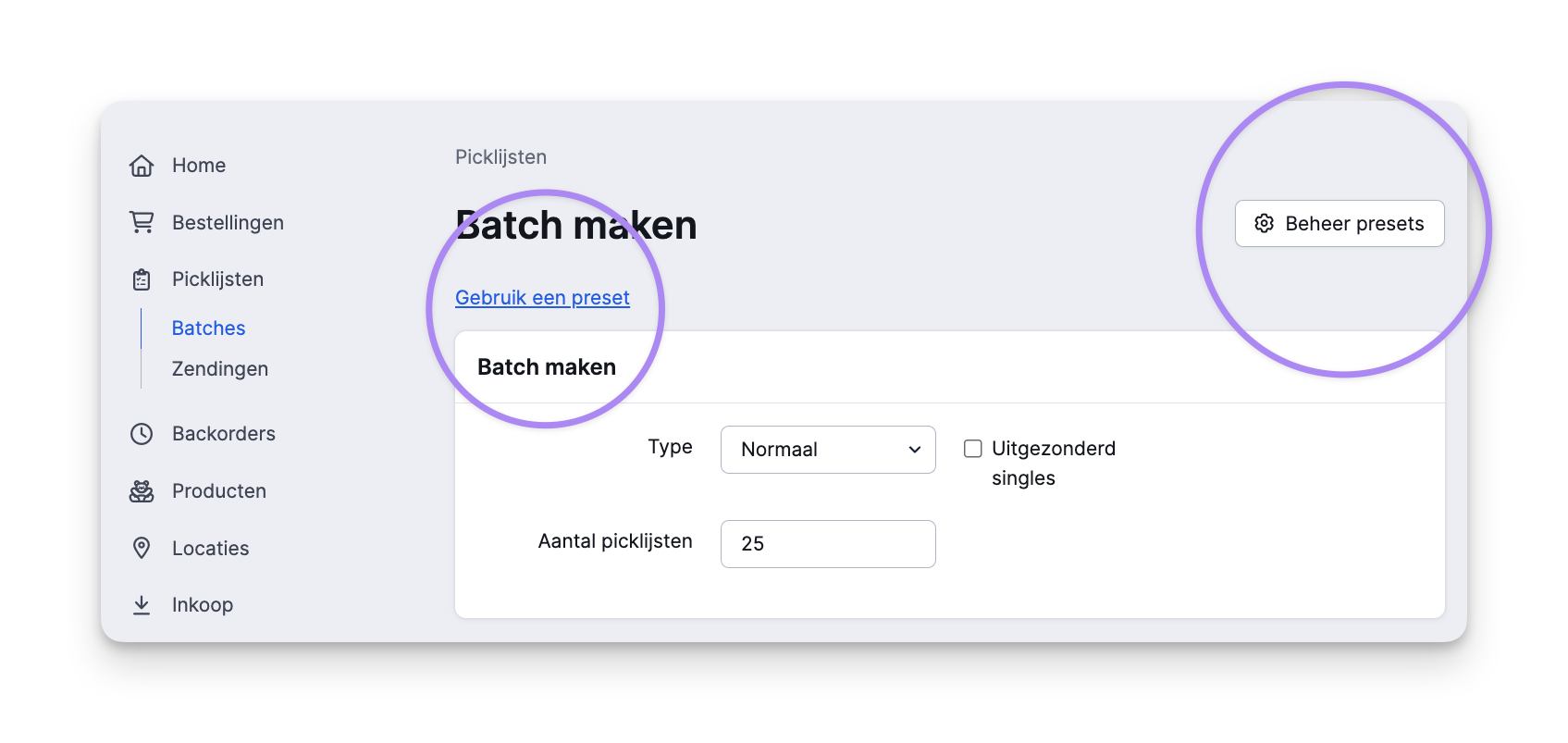
- Give the preset a clear name so everyone knows what type of batch it is.
- Choose the batch type: singles or normal. A singles batch consists of pick lists with just one product (or multiple units of the same product). While picking, there’s no need to separate the products. At the packing table, Picqer shows you which product belongs to which pick list so you can process the orders. A normal batch includes pick lists with more than one product. You separate the orders while picking—often with a cart that has separate bins. Each bin represents one pick list. At the packing table, you process the bins one by one.
- The picking container you use affects how many pick lists you can process in a single batch. Creating a singles batch? A large roll container can hold a lot of products. Creating a normal batch? A cart with 12 bins lets you process 12 pick lists in one batch.
- Specify any additional criteria the batch must meet. Here, you can choose to include or exclude certain products—such as bulky items that don’t fit in bins, or fragile items that you prefer to pick separately.
- Save the preset. When creating a new batch, you can now select your preset. Picqer will fill in all the fields for you. In the preview, you’ll see how many pick lists can currently be processed and how many products are involved. You can also assign the batch to a specific person.
In your warehouse
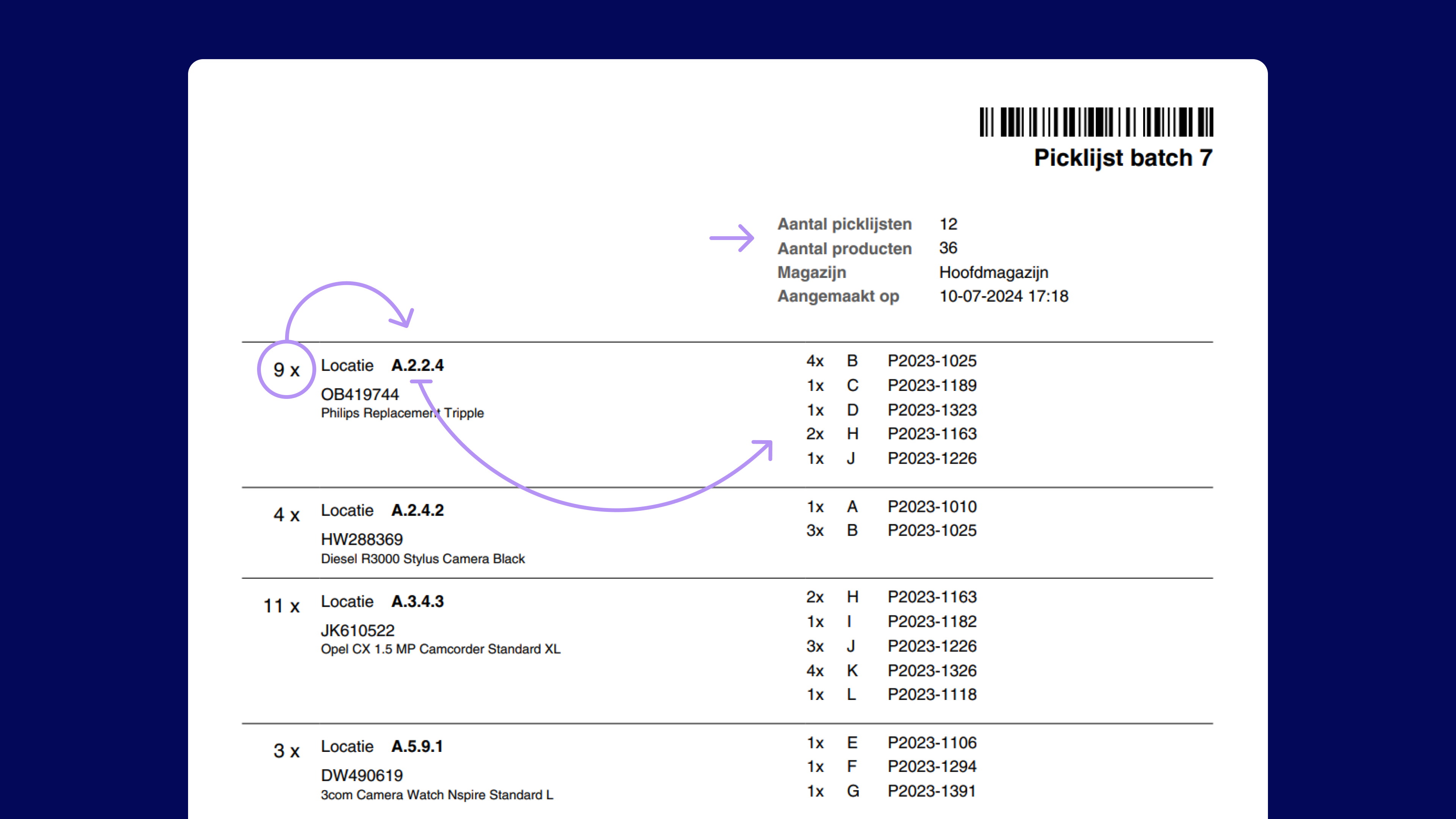
Maybe you’re still printing out a stack of orders each morning and arranging them in the right order. While picking, you try not to lose any pages or mess up the sequence. At the end of your round, you realize product X on page 23 was also on page 6—so you walk back to a location you’ve already visited. With Picqer’s batches, that’s a thing of the past.
Open your batch in the Picqer app or print the list. It shows exactly where each product is located in your warehouse, sorted from A to Z by location. That way, you never have to return to a spot you've already visited. You’ll also see how many units to pick, and—in the case of a normal batch—which bin each product goes in.
Looking for an older article? Browse the full blog archive with all articles.
