
Changelog
We continuously improve Picqer. Every few weeks, we publish a changelog with the latest improvements.
Changelog: Redesigned order page and personalization of the fulfillment portal
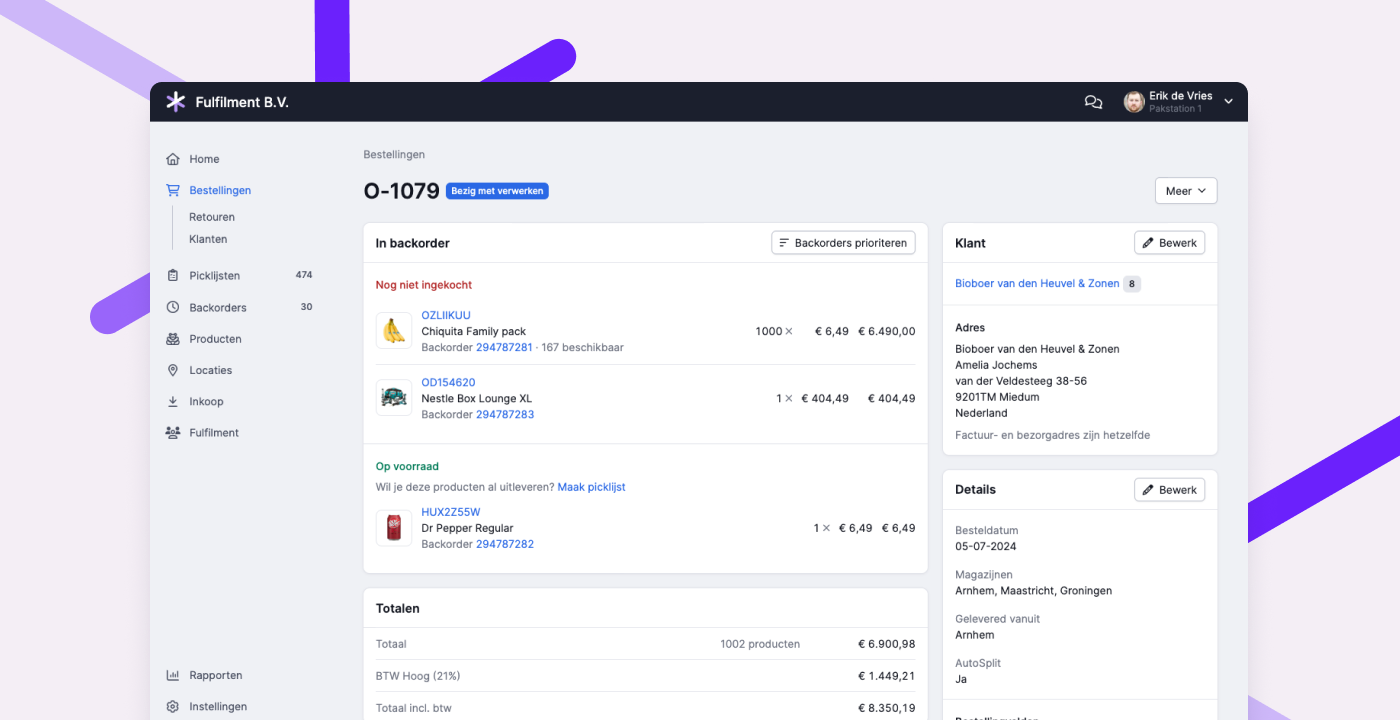
Renewed order page
We have updated the design of the order page. In the new layout, products are grouped by status. This way, you can see at a glance what still needs to be purchased, what you expect to receive (and when), and what is already available or shipped. This allows you to quickly answer the customer question: "When can I expect my order?" Editing draft orders can now also be done directly on the page itself.
You can try the new design through Experimental Features, or by clicking "Try the new design" at the bottom of the order page.
Customizing the fulfillment portal
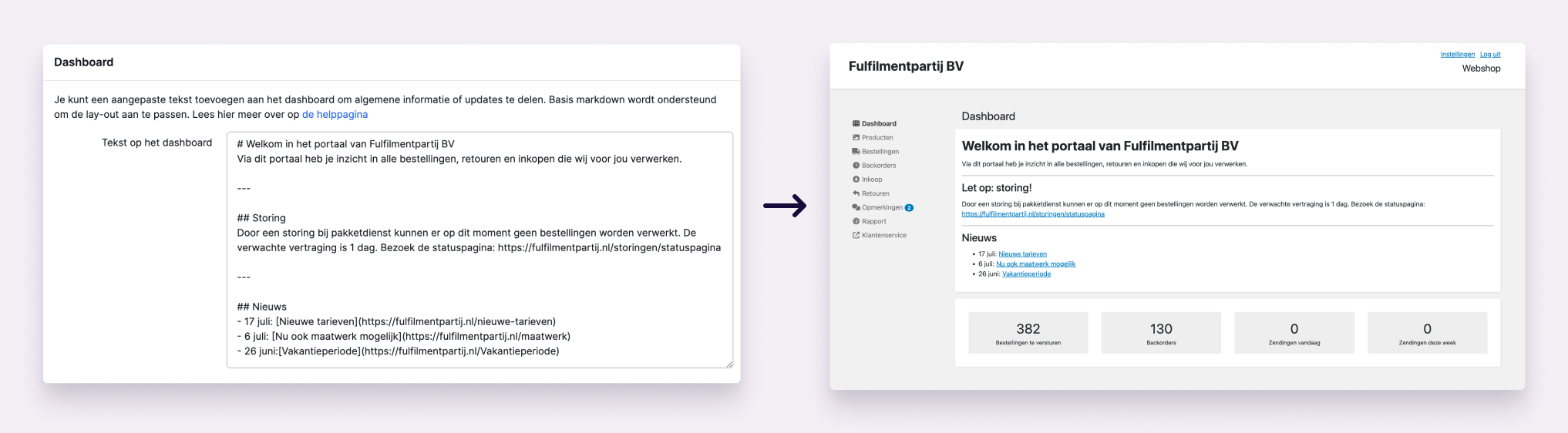
As a fulfillment company, you can now add your own text at the top of the dashboard in the fulfillment portal. This makes it easier to communicate with your customers. Use the text to share general information such as contact details and opening hours, or important updates like disruptions and other news. You can also add your own link to the menu in the portal, for example, directing customers to your website or customer service. Read all about it in this help article.
Other improvements
- The sounds during scanning are now even clearer and more reliable.
- The pages for creating batches and managing batch presets are now more organized. Recommended read: Create batches faster with presets
- When a fulfillment customer is mentioned via the app, these comments are now visible by default in the fulfillment portal. Additionally, we now show the open picklists under an order if a comment is placed that is visible to the fulfillment customer.
- In the API for receipts, it is now possible to request all receipts for a purchase order, including receipts linked to multiple purchase orders.
- In the API for products, it is now possible to filter by product type.
Changelog: Link individual picklists to picking containers and improved return process for fulfillment customers
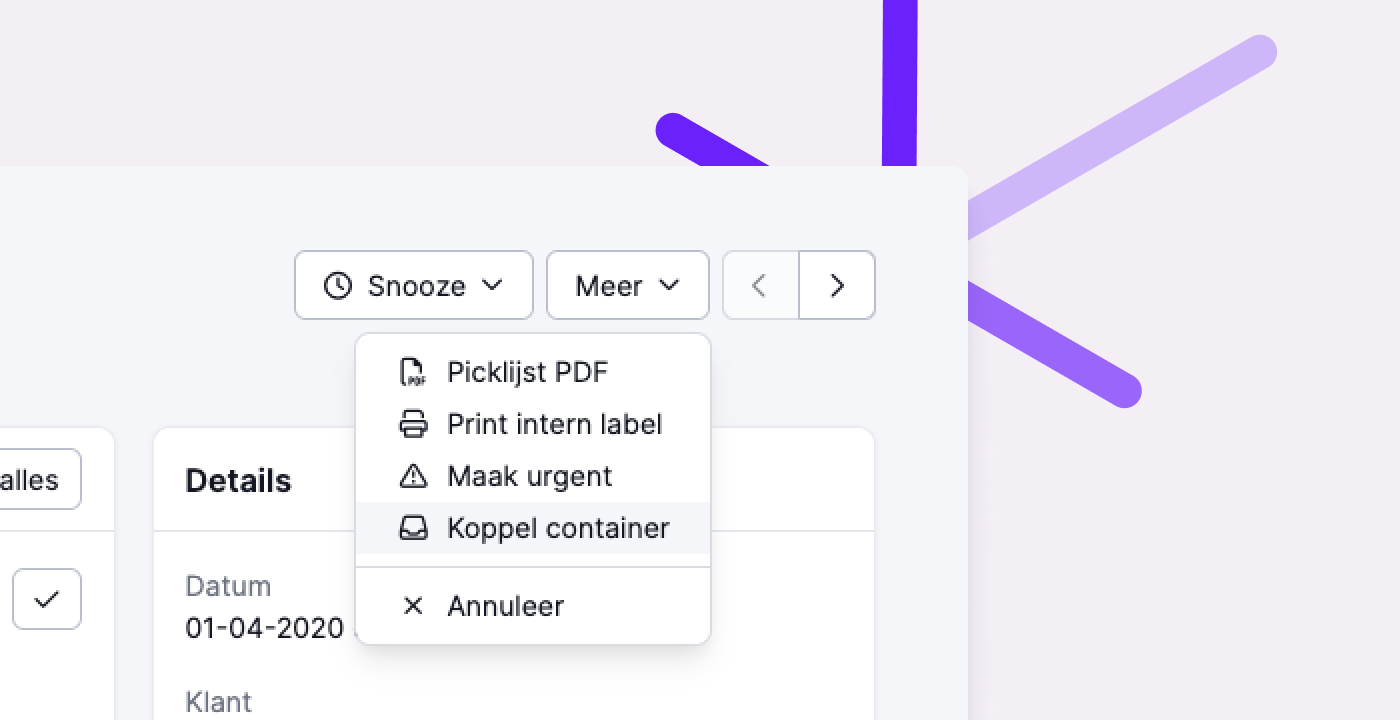
Link individual picklists to picking containers
Some pick lists can’t be processed in a batch—or maybe you're not using batches at all (yet). To ensure you know exactly which products belong to which pick list at the packing table, you’ve likely been printing all pick lists. But that’s no longer necessary.
You can now link an individual pick list to a picking container. When you scan the picking container, the linked pick list appears on the screen. This allows you to work paperlessly even when handling individual pick lists.
Improved return process for fulfillment customers
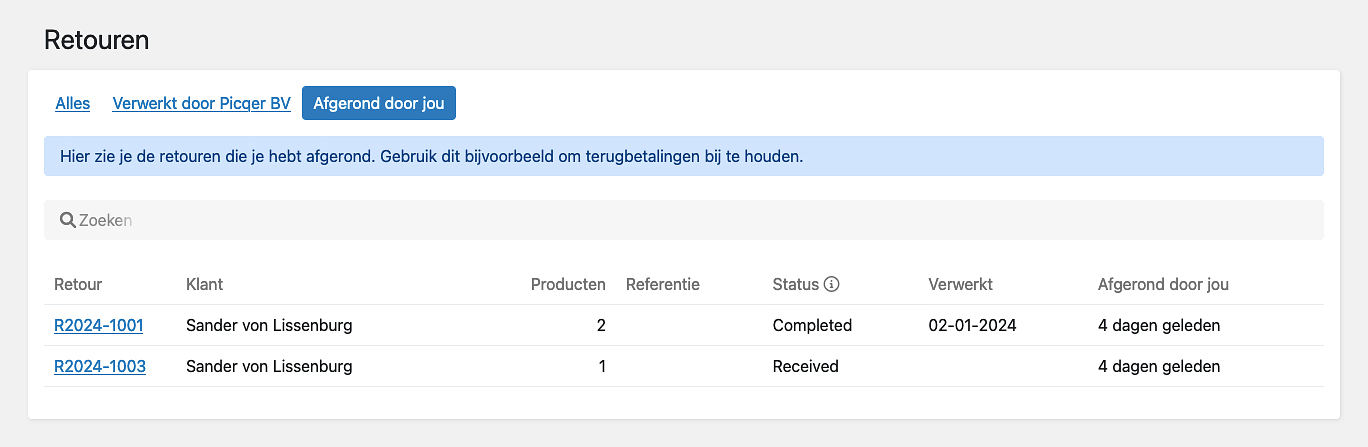
Fulfillment customers can now mark returns as completed in the portal. This is useful for tracking which returns still need action—for example, for issuing refunds after you've processed the return in the warehouse. Only fulfillment customers can mark returns as completed, and this is independent of any status you assign.
Fulfillment customers can also now choose to receive a notification when you process a return in the warehouse.
Other improvements
- We now support VAT rates with decimals. In some countries—like Switzerland, France, Ireland, Italy, and Slovenia—VAT rates include decimal points. You can now enter these correctly in Picqer.
- We’ve added support for sending small parcels to pickup points via MyParcel.
- When you have multiple VAT groups with the same rate, Picqer now correctly handles this during product import. The correct VAT group is always applied.
- We fixed a performance issue in the Android app—pages where you can leave comments now load much faster, even with a large number of users.
- Picqer now supports Shopware version 6.6.
- We’ve added a new integration with ReturnGo.
- In the mobile app, we now show the alias of a pick list when it's part of a batch. This helps verify more quickly if the container still matches the correct alias.
- We’ve introduced a new way to integrate your own shipping carriers. Learn all about it in our help article.
Changelog: Improvements to app navigation and API
This changelog covers updates to the app navigation, API improvements, and several other changes from the past few weeks to help you work more efficiently.
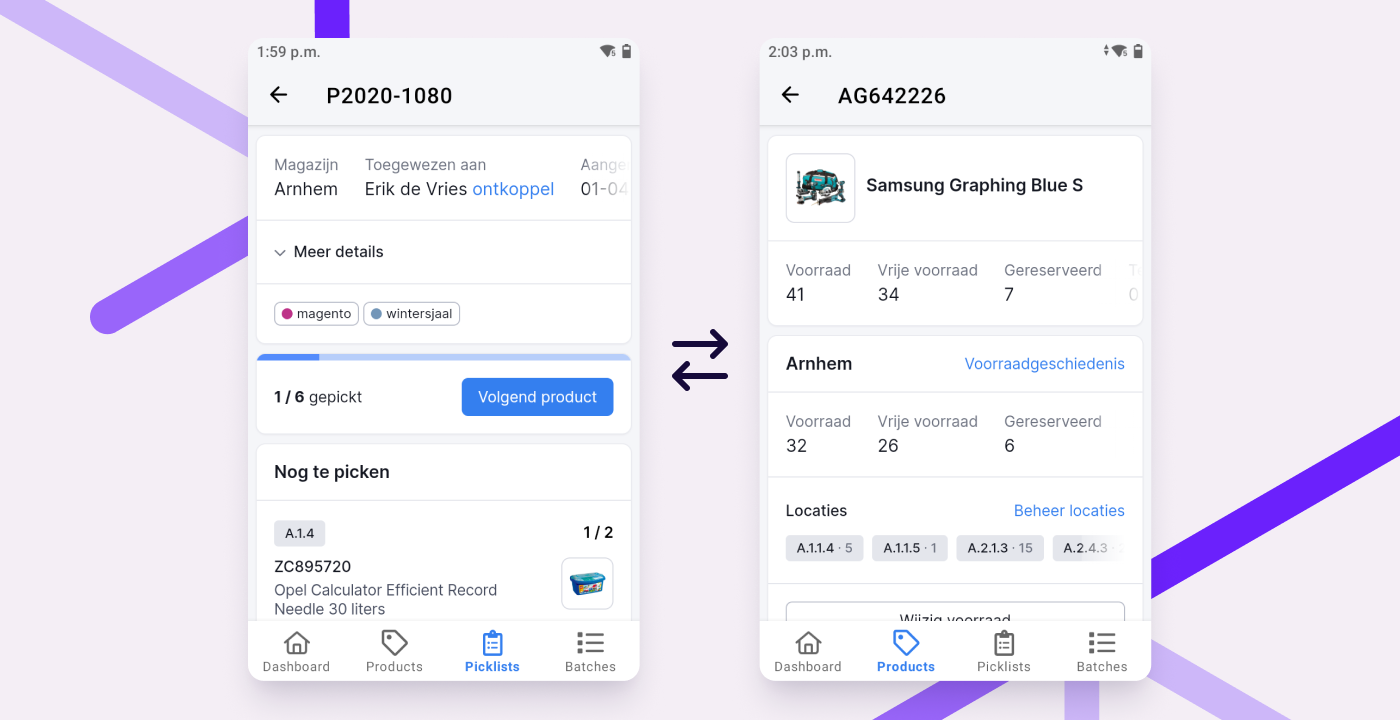
Easier navigation in the app
While picking or restocking, you often want to look up a product. Maybe an item is in the wrong place and needs to be moved, or you need to free up space for something new. After that, you want to continue with your picklist, batch or receiving task.
We’ve made that easier by displaying the navigation bar at the bottom of every detail page, not just on overview pages. This lets you quickly switch between a picklist, batch or receipt and a product, then back again. The app remembers where you left off, so you won’t need to search for your picklist, batch or receipt again.
You can now also return to the picklist overview directly from any picklist using the navigation bar. This is useful when you've scanned multiple picklists and want to jump back to the overview with one tap.
API improvements
Retrieve multiple specific products in one request
With the new idproducts filter on the products endpoint, you can now retrieve multiple specific products in one API request. This is more efficient and faster than sending separate requests.
Retrieve nested product compositions
Our API endpoint for retrieving product parts now supports fetching nested compositions. Use the parameter nested=true to retrieve all parts of a composition and its sub-compositions in one go. Example: /api/v1/products/1/parts?nested=true.
Integration improvements
- WooCommerce: We now import ParcelPro pickup locations on orders.
- Lightspeed: We now import Sendcloud pickup locations on orders.
- Shopware 6: We now support the official PostNL plugin. This includes pickup location selection, delayed shipping and evening delivery when importing orders from Shopware 6.
Other improvements
- When creating a singles batch, we prioritize products that appear on 3 or more picklists. This results in batches with more repeated products, which makes picking more efficient.
- If you've created multiple shipments for a single picklist, all of them can now be included in the shipping notification to the customer. This helps prevent customer service questions about split shipments. Learn more in our help article.
- On the new container history page, you can now see when and which products were linked or unlinked.
- For numeric conditions in rules (like product quantity), you can now use "equals" as a condition.
- On the updated singles batch page, you can now reassign the responsible person.
- When calculating the value for insured shipments with PostNL or MyParcel, we now use the purchase price instead of the selling price to avoid unnecessary insurance costs. If the purchase price is empty (€0.00), the selling price is used instead.
- For shipments containing a virtual product composition, we now calculate the insured amount based on the composition value only, not the individual parts. If the composition’s purchase price is €0.00, we fall back to the selling price.
- If you cancel a batch before any items have been picked, it will now be marked as "Cancelled" rather than "Complete."
- Cancelled orders in Picqer that are partially refunded in Shopify will no longer be reopened in Picqer.
Changelog: Improvements to comments, rules and more
Over the past few weeks, we’ve made a number of improvements to give you more control over comments and rules. Read all about these and other updates in this changelog.
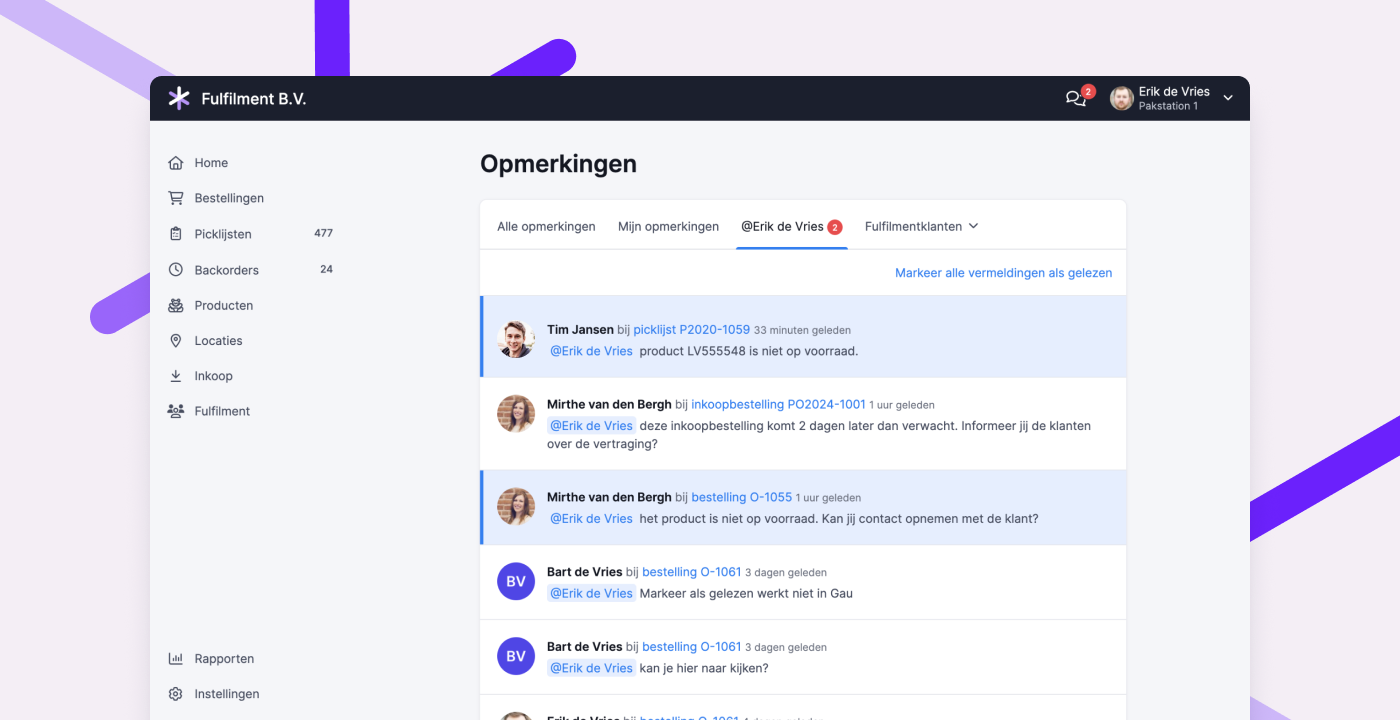
Improvements to comments
Comments help improve collaboration across your warehouse team. They’re useful for leaving notes so your future self and your coworkers know what was agreed upon or what happened and why. With an @mention, you can bring a message or question to the direct attention of a colleague or fulfillment client.
To make commenting even easier, we’ve introduced several improvements:
Better visibility for unread mentions
Previously, all mentions were marked as “read” as soon as you opened the mentions tab. We’ve changed that to help prevent unread mentions from being overlooked.
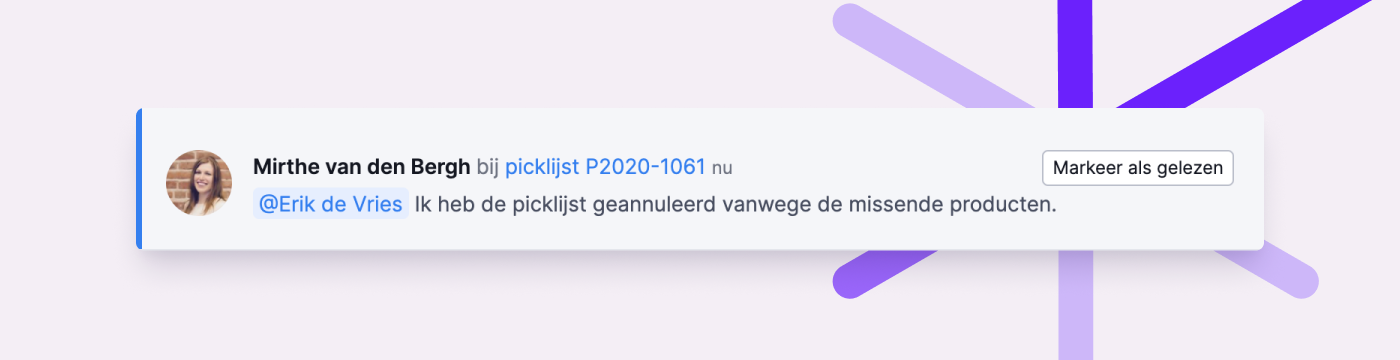
Now, mentions are only marked as “read” after you visit the page where the comment was posted. You can also manually mark mentions as read via the mentions tab by clicking “Mark as read” or “Mark all as read.” Unread mentions are highlighted in blue.
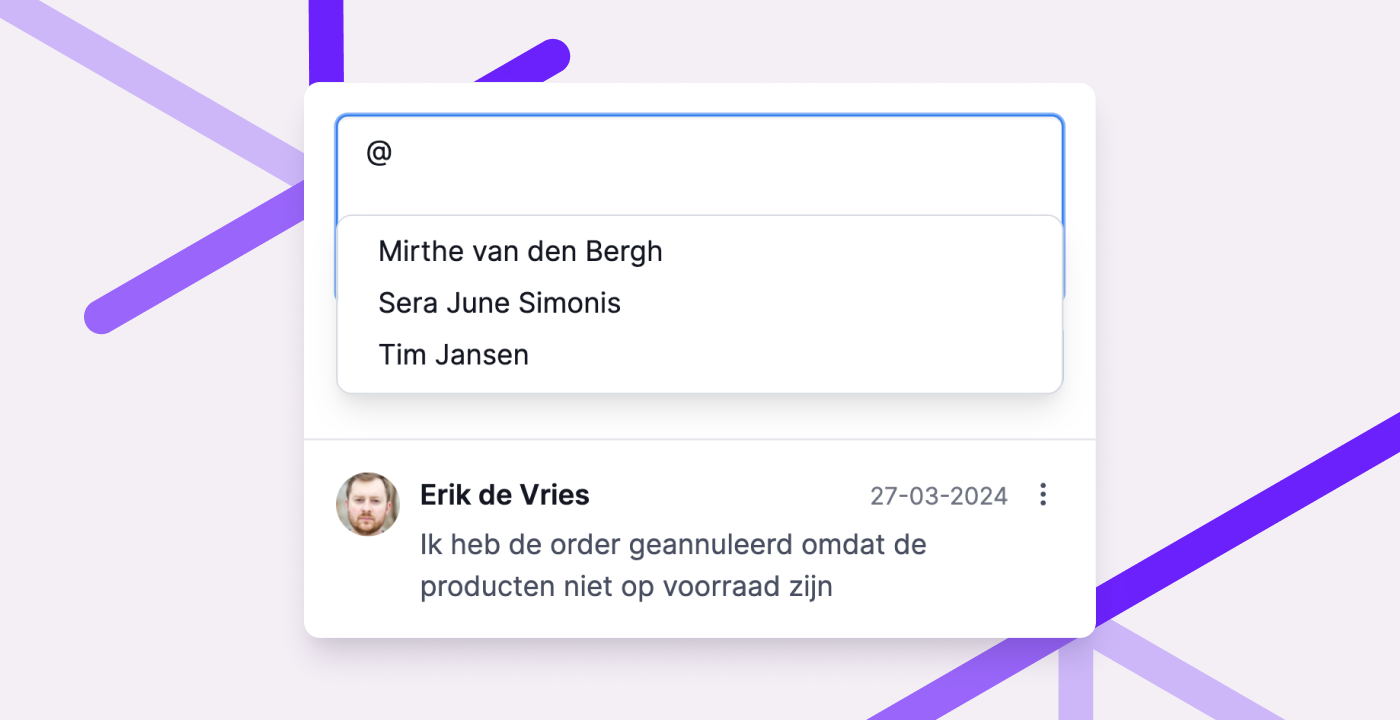
Easily mention colleagues in the app
Are you picking in the app and need to leave a comment or ask a question? You can now mention someone in the app by typing @ and selecting from the list. There’s no need to type their full name.
Better visibility of comments for fulfillment clients
In product, order, purchase and return overviews in the fulfillment portal, clients now see an icon when comments are present. This includes customer comments on an order.
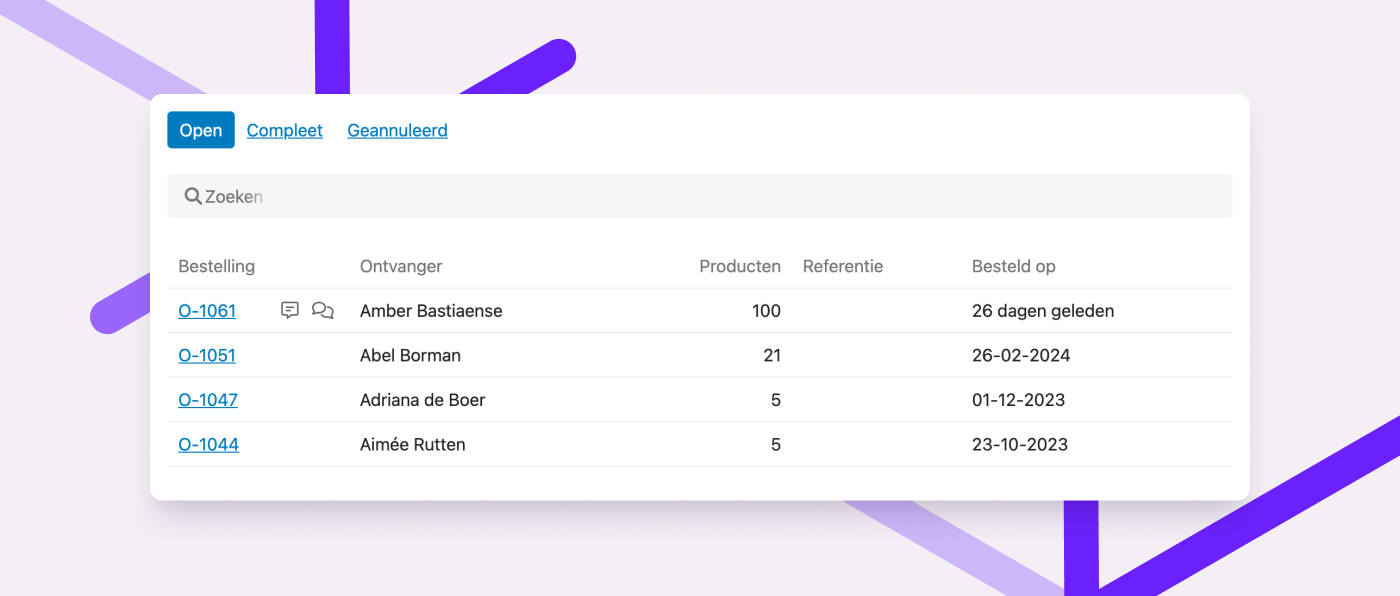
Since most fulfillment clients don’t use the portal all day, it may take a while for them to see and respond to a comment. That’s why clients can now receive email notifications for mentions.
Add an email address in the fulfillment client’s profile to enable this. Clients can also manage their notification preferences on the new settings page in the portal. Email notifications are enabled by default and can only be turned off by the client.
These updates help fulfillment clients stay informed and respond faster when needed.
Read more about commenting in the fulfillment portal in this help article.
Commenting on a fulfillment client page
You can now add internal notes to a fulfillment client's page. These comments are only visible to your team, not the client, and can help document agreements or special arrangements.
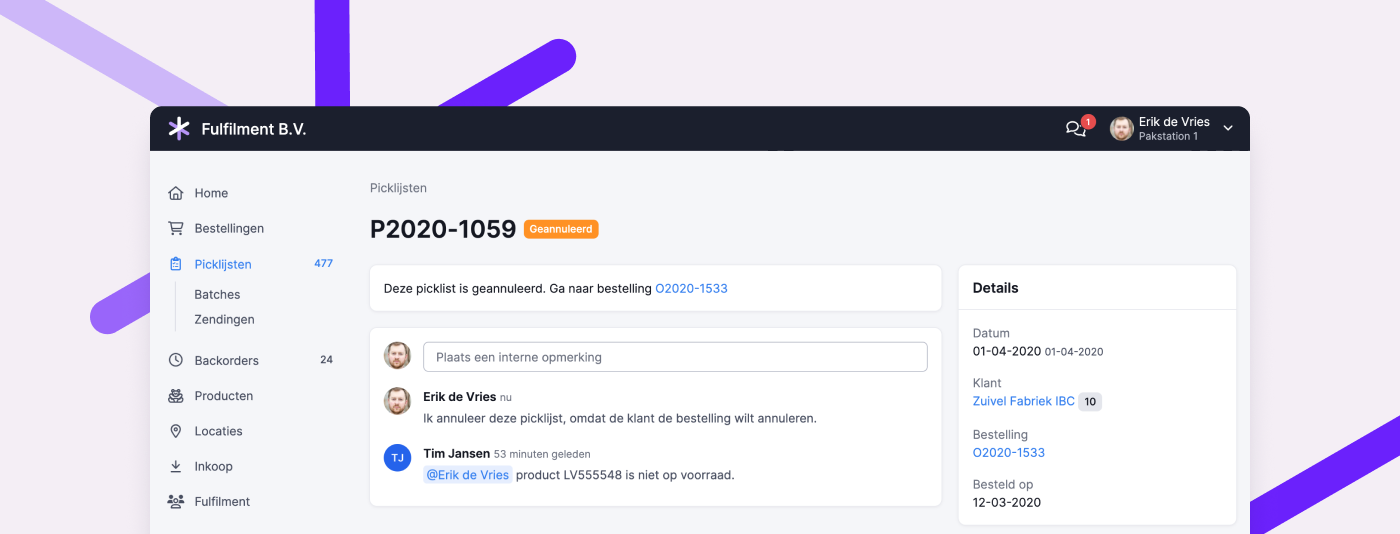
View comments on canceled picklists
If you’ve enabled the experimental feature “Updated picklist and batch pages,” you can now view comments on canceled picklists. This lets you review why a picklist was canceled, if it was explained in a comment.
Improvements to rules
Rules let you automate parts of your workflow, helping you handle exceptions more efficiently. We’ve added a few features to give you even more control.
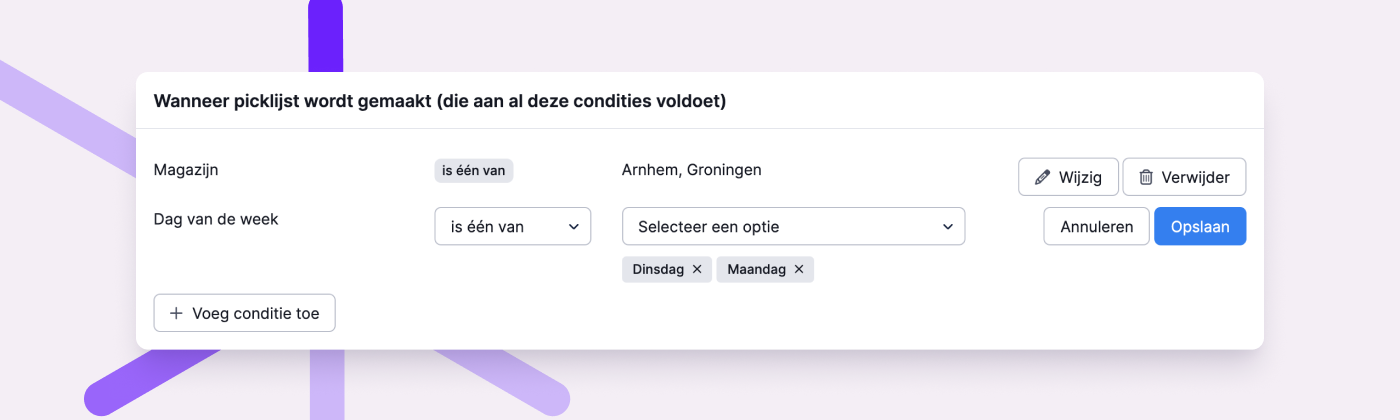
Use multiple warehouses and weekdays in rule conditions
For rules that apply to multiple warehouses or days of the week, you can now use the “is one of” or “is not one of” options. This allows you to select one or more warehouses or days, saving you from having to create separate rules for each.
View rule details from an order log
You could already see which rules had been triggered in the log of an order. Now, you can also click through to view the rule itself, inspect the details, and adjust the configuration or execution order if needed.
Longer condition fields
The maximum number of characters for a rule condition has been increased to 2048. This allows you to enter longer lists, such as product codes.
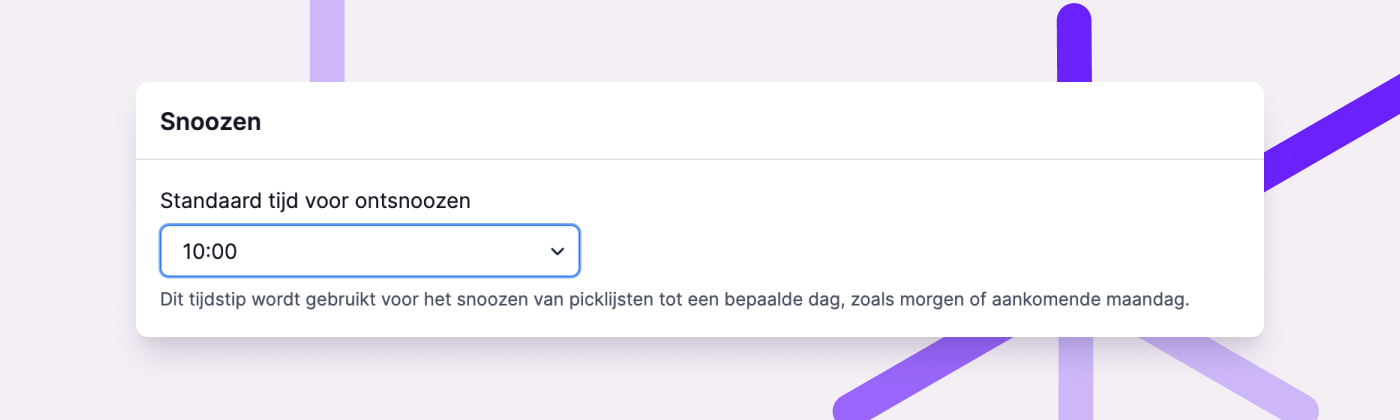
Set a default time for snoozed picklists
Previously, picklists snoozed manually or through certain rule actions were automatically set to resume at 7:00 a.m. You can now define your own default snooze time under General Settings, giving you more flexibility.
Other improvements
- When linking a picking container, you’ll now see the fulfillment client associated with the picklist. This helps you choose the correct container size.
- Customer comments from Shopware 6 are now imported with the order.
- If a picklist is canceled, any associated shipments will now be automatically canceled as well.
- If you’ve disabled automatic shipment creation in the app, it will no longer prompt you to create one.
- You can now see in the product log when and by whom a product was made active or inactive.
- Use the keyboard shortcut Ctrl + Enter (or Cmd + Enter on Mac) to submit a comment. It’s just a little quicker than clicking the “Post comment” button.
Changelog: New conditions and actions for rules, and more updates
In recent weeks, we’ve introduced several improvements for date and time-based rules. Read more about these and other updates in this changelog.
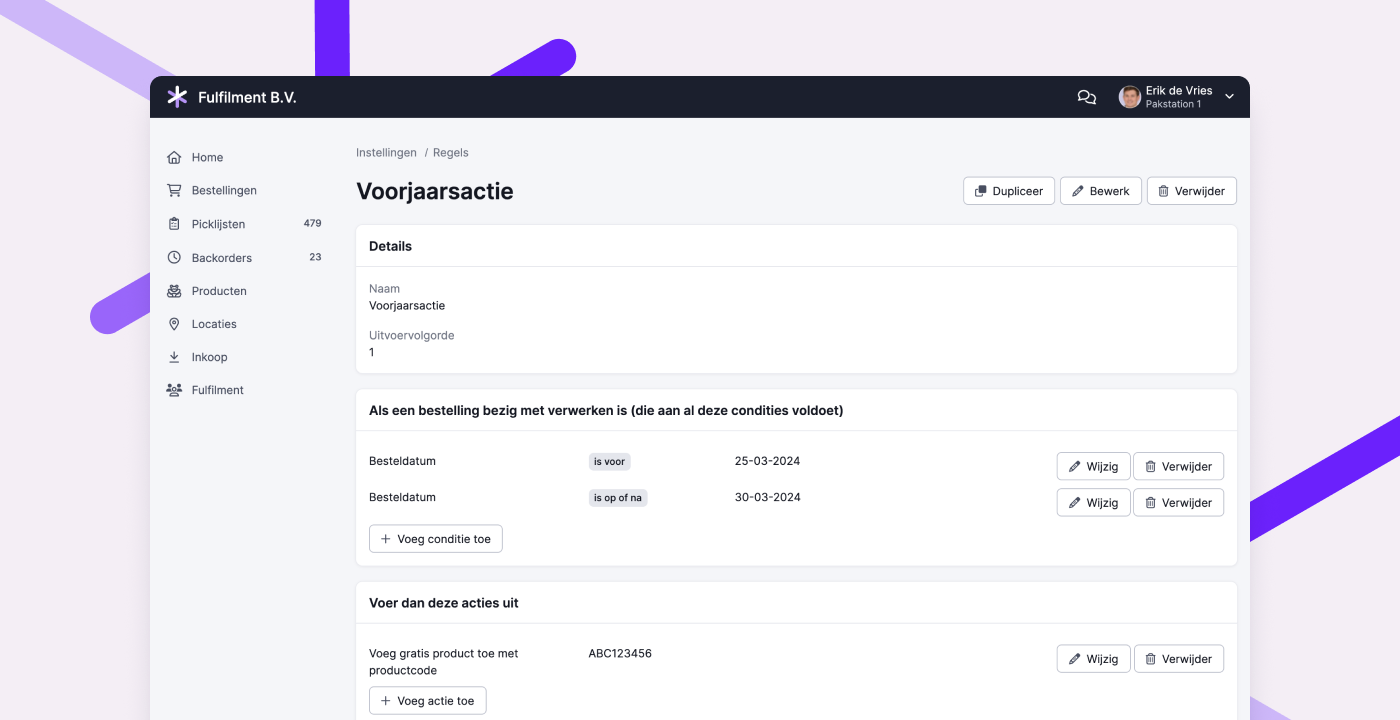
Conditions based on order date and time
You can now set specific order dates or times as rule conditions. For both, you can choose from two options:
- The order was placed before the date or time
- The order was placed on or after the date or time
You can combine multiple conditions to trigger actions during a specific time frame. For example, you could offer a free gift for orders placed during a promotional period, or apply a different shipping method depending on the time an order was placed.
Snooze picklists for a set number of hours or until a specific date
When snoozing a picklist using a rule, you can now specify how many hours it should be snoozed. You can also set a specific date to resume the picklist. This is especially useful for pre-orders that should only ship on or after the product release date.
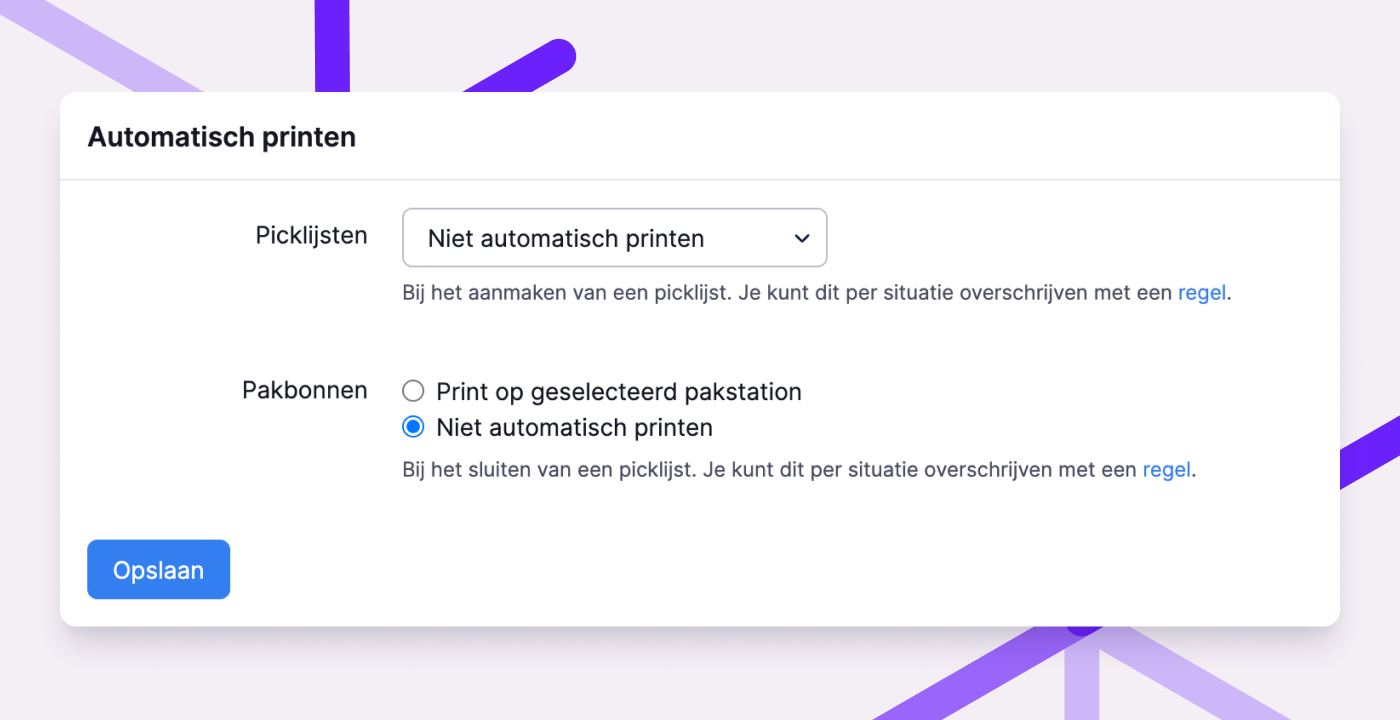
More control over printing packing slips
Previously, packing slips were always printed automatically if a packing slip printer was set up at the packing station. You can now decide whether to print packing slips at all. Using rules, you can override that default setting. This gives you full control and can save a lot of unnecessary paper.
Read more in the help article on printers and packing stations.
Other improvements
- Processing orders with many backorders and/or product compositions is now much faster.
- In the popup for creating a shipment, you now clearly see which shipping profile was preselected via a rule.
- We’ve added a new integration with Sendy.
- You can now quickly recognize which orders were placed via the fulfillment portal with a dedicated icon in the order overview.
- The shipping method “Small Parcel” from PostNL has been added to the MyParcel integration.
- When you turn a product into a virtual composition or mark it as having infinite stock, the ABC classification is removed.
- The graph on the customer page showing order history now always displays accurate data.
- A warning is shown if you try to leave a rule setup page without saving your changes.
- We now import QLS service points for orders from Shopify and Lightspeed, so the information is automatically passed to the carrier.
- When creating a purchase order via the API, you can now include a
delivery_date. - The track & trace URL for shipments to Belgian pickup points now works correctly again.
- The customer and supplier pages have been redesigned for improved organization and consistency with the rest of Picqer.
- The normal and singles batch pages have been updated for users who have enabled the experimental feature “Updated picklist and batch pages.”
